
Financial institutions worldwide use standardized templates and structures to present account information, creating what professionals call a bank format. This standardized approach ensures consistency across statements, enables automated processing, and helps businesses maintain accurate financial records. Understanding these formatting conventions has become essential for accountants, bookkeepers, and finance professionals who process hundreds of statements monthly. As digital transformation accelerates, the variety and complexity of bank format options continue to expand, requiring careful consideration when selecting tools and establishing workflows.
The Foundation of Bank Statement Formatting
A bank format represents the structured layout and data organization that financial institutions use to present transaction histories, balances, and account details. These formats range from traditional paper layouts to sophisticated digital file types designed for seamless integration with accounting software.
Financial institutions typically provide statements in multiple formats to accommodate different user needs. The most common bank format options include PDF documents, comma-separated value (CSV) files, Open Financial Exchange (OFX) files, and Quicken Financial Exchange (QFX) files. Each format serves distinct purposes and offers varying levels of data accessibility.
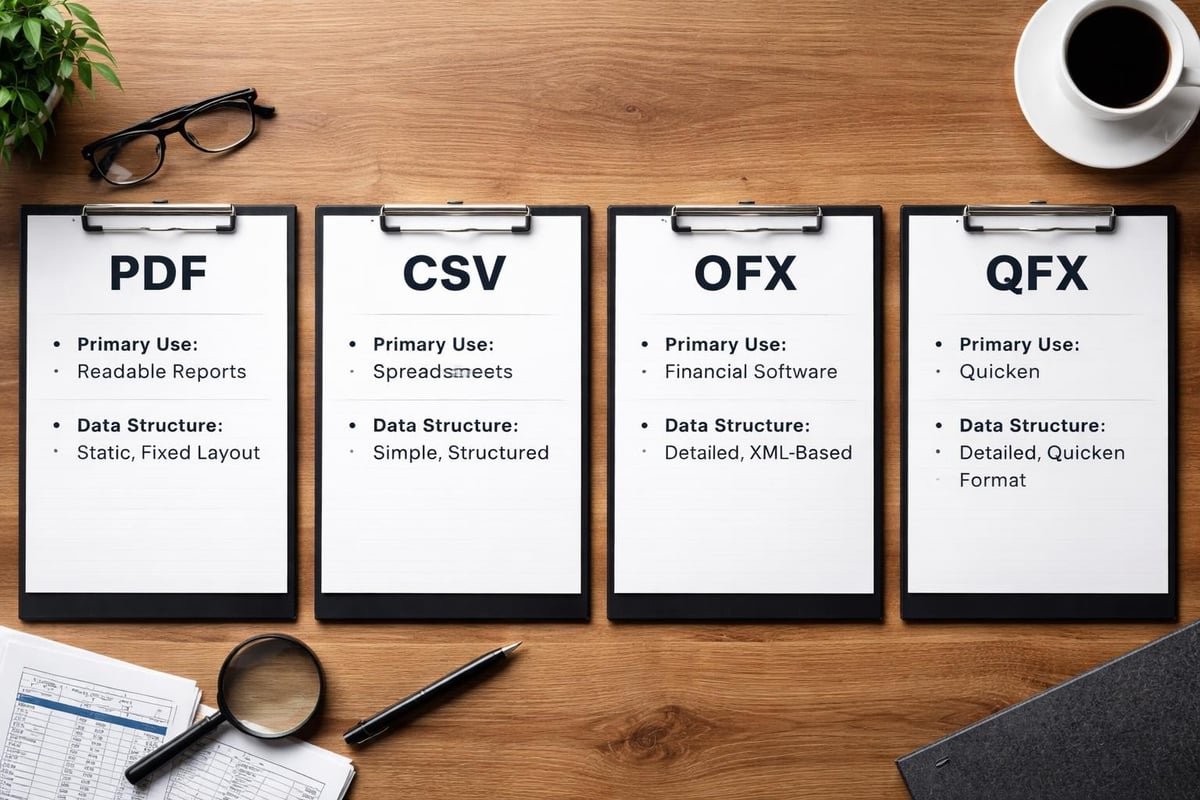
The bank statement formats landscape has evolved significantly over the past decade. PDF remains the most widely distributed format due to its security features and universal compatibility, but it presents challenges for automated data extraction. Meanwhile, CSV files offer simple tabular data that spreadsheet applications can easily parse, though they lack the standardized structure of OFX and QFX formats.
Why Bank Format Standardization Matters
Consistency in bank format allows financial software to reliably parse transaction data, categorize expenses, and reconcile accounts without manual intervention. When banks follow established formatting conventions, businesses can streamline their bookkeeping processes and reduce errors associated with manual data entry.
The absence of universal standardization remains a persistent challenge. Different financial institutions interpret format specifications differently, leading to variations that complicate automated processing. Some banks include merchant category codes in their transaction descriptions, while others provide minimal detail. These inconsistencies force finance professionals to maintain custom parsing rules for each institution.
Digital Bank Format Types and Their Applications
Understanding the technical specifications of each bank format helps businesses select appropriate tools and establish efficient workflows.
PDF Bank Statements
PDF documents represent the most ubiquitous bank format for official statement distribution. Banks favor PDFs because they preserve visual formatting, prevent unauthorized alterations, and maintain consistent appearance across devices and platforms.
Advantages of PDF bank format:
- Maintains official document integrity
- Includes bank branding and verification elements
- Universal compatibility across operating systems
- Supports password protection for sensitive data
Limitations to consider:
- Data remains locked in visual presentation
- Requires extraction tools for accounting software integration
- Copy-paste operations often introduce formatting errors
- Inconsistent table structures complicate automated parsing
Extracting data from PDF bank statements requires specialized approaches that can interpret document structure and identify transaction tables within varied layouts. Modern solutions employ artificial intelligence to recognize patterns and extract data with high accuracy.
CSV and Excel-Compatible Formats
The CSV bank format provides transaction data in plain text files with comma-separated values. This simplicity makes CSVs highly compatible with spreadsheet applications and accounting platforms, though the lack of standardization means column arrangements vary significantly between institutions.
| Format Feature | CSV | Excel (XLSX) |
|---|---|---|
| File Size | Very small | Moderate |
| Formatting Support | None | Full |
| Formula Capability | No | Yes |
| Universal Compatibility | Excellent | Good |
| Bank Adoption | High | Moderate |
Excel-based formats extend CSV functionality by supporting multiple sheets, formulas, and formatted cells. Some banks provide downloadable Excel files that include summary calculations and categorized transactions, though these enhanced features can interfere with automated import processes.
OFX and QFX Structured Data Formats
Open Financial Exchange (OFX) represents a standardized bank format specifically designed for financial data exchange between institutions and software applications. This XML-based format includes structured tags that identify transaction types, dates, amounts, and merchant information.
The QFX format, developed by Intuit for Quicken, extends OFX specifications with proprietary enhancements. While functionally similar to OFX, QFX files are optimized for Intuit products and may include additional metadata fields.
Key advantages of structured formats:
- Standardized field definitions reduce parsing ambiguity
- Built-in transaction categorization support
- Automatic posting date and settlement date distinction
- Account balance verification data included
- Multi-account statements in single file support
Financial institutions that support electronic bank statement formats through standardized protocols enable seamless integration with enterprise resource planning systems. These connections automate reconciliation workflows and reduce manual data handling.
Bank Format Requirements for Financial Processing
Professional accounting workflows demand specific bank format characteristics to ensure data integrity and processing efficiency. Understanding these requirements helps businesses establish robust financial management systems.

Mandatory Data Elements
Every functional bank format must include certain core information elements to support accurate bookkeeping and reconciliation. Transaction dates, descriptions, debit and credit amounts, and running balances form the foundation of useful statement data.
Bank statement formatting guidelines emphasize the importance of complete transaction descriptions that enable proper categorization. Cryptic merchant codes or abbreviated references create ambiguity that requires manual research and correction.
Account identifiers, statement periods, opening balances, and closing balances provide essential context for reconciliation processes. Missing or inconsistent formatting in these elements can trigger import failures or create reconciliation discrepancies.
Column Mapping and Field Definition
When working with bank format files, understanding how data maps to accounting system fields prevents categorization errors and duplicate entries. Different banks arrange transaction data differently, requiring flexible mapping configurations.
Common column variations across bank formats:
- Date fields may show transaction date, posting date, or both
- Amount representation varies (separate debit/credit columns vs. signed single column)
- Description fields range from detailed merchant information to transaction codes
- Balance columns may appear after each transaction or only at statement end
- Check numbers and reference identifiers occupy different positions
Bank statement definition fields documentation reveals the complexity of mapping diverse format structures to standardized accounting system expectations. Creating accurate mapping configurations requires careful analysis of sample data from each financial institution.
Multi-Currency and International Considerations
Global businesses encounter bank format challenges when dealing with multiple currencies and international transaction formats. Date formatting conventions differ between regions, with some banks using DD/MM/YYYY while others employ MM/DD/YYYY or YYYY-MM-DD.
Currency symbols, thousand separators, and decimal markers vary internationally. A bank format that represents one thousand dollars might appear as "$1,000.00", "1.000,00 $", or "1 000,00 USD" depending on the institution's regional conventions. Processing systems must account for these variations to avoid catastrophic misinterpretation of transaction amounts.
Technology Solutions for Bank Format Processing
The complexity of bank format variations has driven significant innovation in automated processing technologies. Modern solutions leverage artificial intelligence and machine learning to handle format inconsistencies that previously required manual intervention.
AI-Powered Format Recognition
Advanced table detection algorithms can identify transaction tables within PDF bank statements regardless of layout variations. Research in table structure recognition demonstrates how specialized models accurately detect and parse tabular data from diverse document formats.
These technologies analyze document structure, identify column headers, and extract transaction rows with minimal configuration. By training on thousands of statement examples, AI systems learn to recognize patterns across different bank format implementations.
Automated Data Extraction Workflows
Modern bank statement extraction solutions process unstructured PDF documents and convert them into structured data formats compatible with accounting platforms. These systems handle format variations automatically, reducing the configuration burden on finance teams.
The conversion process typically involves several stages:
- Document intake and security validation
- Format identification and structure analysis
- Table detection and boundary identification
- Data extraction and field recognition
- Format standardization and validation
- Output generation in target format
Professional-grade extraction services, such as those that convert PDF bank statements to usable spreadsheets, employ sophisticated algorithms that achieve accuracy rates exceeding 99% across diverse bank format variations. This precision eliminates the data quality issues that plague manual extraction methods.
Integration with Accounting Platforms
Converting bank format data into accounting system-compatible structures represents only part of the workflow. Effective solutions provide direct integration with popular platforms, enabling seamless data flow from statement to general ledger.
| Platform | Supported Import Formats | Auto-Categorization | Reconciliation Tools |
|---|---|---|---|
| QuickBooks | QBO, IIF, CSV, OFX | Yes | Advanced |
| Xero | OFX, QIF, CSV | Yes | Moderate |
| FreshBooks | CSV | Limited | Basic |
| Wave | CSV, OFX | Yes | Moderate |
Understanding how bank reconciliation works in Xero and similar platforms helps businesses configure optimal import workflows. Different accounting systems expect specific bank format characteristics, requiring format conversion or transformation before import.
Best Practices for Bank Format Management
Establishing consistent procedures for handling bank format data reduces errors and streamlines financial operations. These practices apply whether processing statements manually or using automated solutions.
Standardize File Naming Conventions
Implementing systematic naming conventions for downloaded bank format files prevents confusion and enables automated processing. Include account identifiers, statement dates, and format types in filenames to facilitate organization and retrieval.
Recommended naming structure:
- AccountName_YYYY-MM_BankName_Format.extension
- Example: Operating_2026-04_Chase_Statement.pdf
- Example: Payroll_2026-04_BofA_Transactions.csv
Maintain Format Documentation
Document the specific bank format characteristics for each financial institution your organization uses. Record column arrangements, date formats, currency conventions, and any unique identifiers that appear in statements.
This documentation proves invaluable when configuring new accounting software, troubleshooting import failures, or training new team members. Update documentation whenever banks modify their format specifications or introduce new download options.

Implement Verification Procedures
Always verify that extracted transaction data matches source statement totals before importing into accounting systems. Compare transaction counts, total debits, total credits, and ending balances between the original bank format file and the extracted data set.
Verification checklist:
- Transaction count matches between source and extracted data
- Sum of debits equals statement total debits
- Sum of credits equals statement total credits
- Opening balance matches previous period closing balance
- Closing balance reconciles with calculated balance
- No duplicate transactions appear in extracted data
- Date ranges align with statement period
Security and Compliance Considerations
Bank format files contain sensitive financial information requiring appropriate security measures. Store statement files in encrypted locations with restricted access permissions. When transmitting files to processing services, verify that providers maintain bank-level security protocols including encryption, secure data centers, and compliance certifications.
Retain bank format files according to applicable regulatory requirements and internal policies. Many organizations maintain seven years of statement archives to support audits, tax filings, and historical analysis.
Selecting Bank Format Processing Tools
The market offers numerous solutions for handling bank format challenges, ranging from manual spreadsheet templates to enterprise-grade automated platforms. Evaluating bank statement extraction software requires consideration of accuracy, format compatibility, integration capabilities, and security features.
Evaluation Criteria for Processing Solutions
When comparing bank format processing tools, prioritize solutions that handle your specific mix of financial institutions and statement types. Test candidate solutions with actual statement samples rather than relying solely on vendor claims about format support.
Key selection factors:
- Accuracy rates across your specific bank formats
- Number of supported financial institutions
- Output format compatibility with your accounting platform
- Processing speed for typical monthly statement volumes
- Security certifications and data handling practices
- Customer support responsiveness and technical expertise
Scalability and Volume Considerations
Organizations processing high volumes of statements require solutions that handle batch operations efficiently. Evaluate whether tools support bulk uploads, automated scheduling, and API integration for programmatic access.
Understanding banking needs for different business types helps inform tool selection. Freelancers may prioritize simplicity and low costs, while enterprise finance departments need robust audit trails and multi-user access controls.
Cost-Benefit Analysis
Compare the total cost of bank format processing solutions against the time savings and error reduction they provide. Calculate the labor hours currently spent on manual statement processing, multiply by loaded labor rates, and factor in the cost of errors that require correction.
Automated solutions typically generate positive returns when processing more than ten statements monthly. Organizations handling hundreds of statements realize substantial efficiency gains and quality improvements that justify premium processing services.
Advanced Bank Format Applications
Beyond basic transaction extraction, bank format data supports sophisticated financial analysis and decision-making processes. Forward-thinking organizations leverage statement data for cash flow forecasting, spending pattern analysis, and financial health assessment.
Credit Risk Assessment and Scoring
Financial institutions increasingly use transaction-level data from bank formats to enhance credit scoring models. Research demonstrates that features derived from bank statements improve credit risk predictions and provide insights into borrower financial behavior that traditional scoring methods miss.
Analyzing deposit patterns, expense regularity, and balance trends from bank format data helps lenders assess repayment capacity more accurately than income documentation alone. This approach particularly benefits borrowers with limited credit histories who demonstrate responsible financial management through their transaction patterns.
Cash Flow Analysis and Forecasting
Extracting historical transaction data from bank format files enables sophisticated cash flow modeling. By categorizing recurring expenses, identifying seasonal patterns, and tracking payment timing, businesses can forecast future cash positions with greater accuracy.
Machine learning models trained on historical bank format data can predict likely expense timing, identify unusual transactions that merit investigation, and alert management to potential cash shortfalls before they occur.
Automated Categorization and Tax Preparation
Well-structured bank format data facilitates automated transaction categorization using rule-based systems or machine learning classifiers. These systems learn from historical categorizations and apply consistent logic across new transactions, reducing the manual effort required for tax preparation and financial reporting.
Integration between bank format processing tools and tax software enables direct flow of categorized transaction data into tax forms, eliminating redundant data entry and reducing errors in deduction calculations.
Managing diverse bank format requirements remains a persistent challenge for financial professionals handling digital statements across multiple institutions. Understanding format specifications, implementing proper verification procedures, and selecting appropriate processing tools creates the foundation for efficient, accurate financial data management. Bank Statement Boss eliminates the complexity of bank format variations through AI-powered conversion technology that transforms PDF statements into accounting-ready spreadsheets with 99% accuracy, providing seamless compatibility with major accounting platforms while maintaining enterprise-grade security for your sensitive financial data.