
Managing financial records efficiently requires understanding how to access and utilize your US Bank bank statement effectively. Whether you're a business owner tracking expenses, an accountant reconciling multiple accounts, or an individual monitoring your finances, knowing how to obtain and work with your statements is fundamental to maintaining accurate financial records. US Bank provides multiple channels for accessing your statements, from digital downloads to paper copies, each serving different needs and preferences.
Understanding Your US Bank Bank Statement Structure
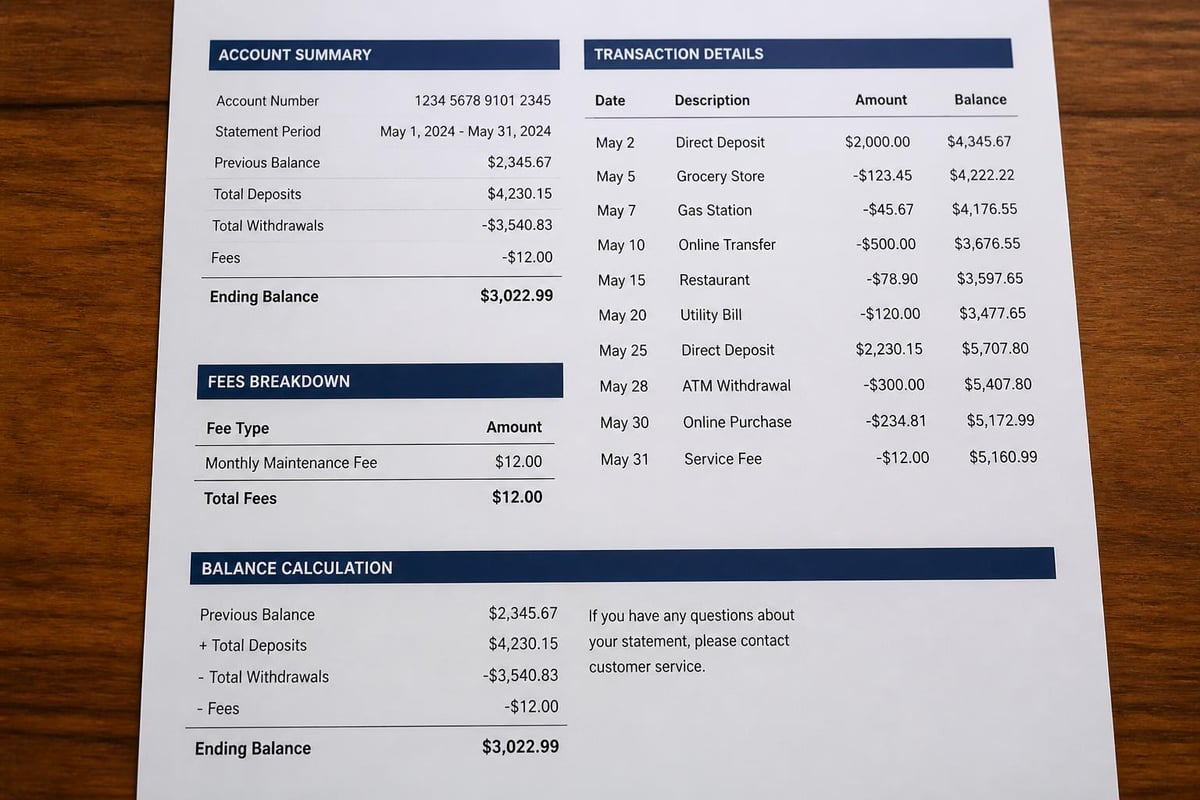
A us bank bank statement contains comprehensive information about your account activity during a specific statement period. The document typically covers a monthly cycle and includes your opening balance, all transactions, fees, interest earned, and your ending balance.
Key Components of Your Statement
Every us bank bank statement follows a standardized format that makes it easier to review your financial activity. The header section displays your account information, including your account number, statement period dates, and contact information. This section also shows your beginning balance from the previous statement cycle.
The transaction section forms the bulk of your statement and lists all activity chronologically. Each entry includes:
- Transaction date and description
- Debit or credit amounts
- Running balance after each transaction
- Reference numbers for tracking purposes
- Merchant or payee information
Your statement also includes a summary section that breaks down totals for deposits, withdrawals, fees, and interest. This overview helps you quickly assess your account activity without reviewing every individual transaction.
Fee Disclosures and Interest Calculations
The us bank bank statement provides detailed information about any fees assessed to your account. Monthly maintenance fees, overdraft charges, ATM fees, and wire transfer costs all appear with clear descriptions. Understanding these charges helps identify areas where you might reduce banking costs.
For interest-bearing accounts, your statement shows how interest was calculated and credited. The annual percentage yield (APY) and the actual interest earned during the statement period appear prominently, allowing you to verify calculations and understand your returns.
Accessing Your US Bank Bank Statement Online
US Bank offers robust digital banking tools that make accessing your us bank bank statement straightforward and secure. The online banking platform provides immediate access to current and historical statements without waiting for mail delivery.
Digital Statement Download Process
To view and download your statements, log into your US Bank online banking account and navigate to the statements section. The platform allows you to view statements directly in your browser or download them as PDF files for your records.
The download process typically involves these steps:
- Select the account you want to review
- Choose the statement period from available dates
- Select your preferred format (PDF or CSV)
- Download the file to your device
- Save or print as needed for your records
Digital statements offer several advantages over paper versions. They're available immediately after the statement period closes, they can't be lost in the mail, and they're searchable if you need to find specific transactions quickly.
Mobile App Statement Access
The US Bank mobile app provides the same statement access capabilities as the desktop platform. You can download statements using your mobile device, making it convenient to access your financial records while traveling or away from your computer.
Mobile access proves particularly valuable for business owners who need to review statements during meetings or share financial information with accountants or partners. The app maintains the same security standards as the desktop platform, ensuring your sensitive financial data remains protected.
Historical Statement Retrieval and Record Keeping
Maintaining access to historical financial records serves multiple purposes, from tax preparation to loan applications. US Bank provides options for retrieving past statements, though the process varies depending on how far back you need to go.
Available Statement History
Through online banking, you can typically access us bank bank statement records for the past seven years. This extended history covers most situations where you might need historical financial documentation, including tax audits, loan applications, and legal proceedings.
| Time Period | Access Method | Typical Cost | Processing Time |
|---|---|---|---|
| Current month | Online/Mobile | Free | Immediate |
| Past 12 months | Online/Mobile | Free | Immediate |
| 1-7 years | Online/Mobile | Free | Immediate |
| Over 7 years | Customer service request | May apply | 7-10 business days |
For statements older than seven years, you'll need to contact US Bank customer service to order copies. This process may involve fees and requires additional processing time.
Organizing Digital Statement Archives
Creating a systematic approach to organizing your downloaded us bank bank statement files ensures you can find needed documents quickly. Consider establishing a folder structure that separates statements by year and account type.
For business accounts, integrate statement downloads into your regular accounting workflow. Schedule monthly downloads immediately after statements become available, ensuring your financial records remain complete and current. This practice proves invaluable during tax season or when preparing financial reports.
Statement Format Options and Conversion Needs
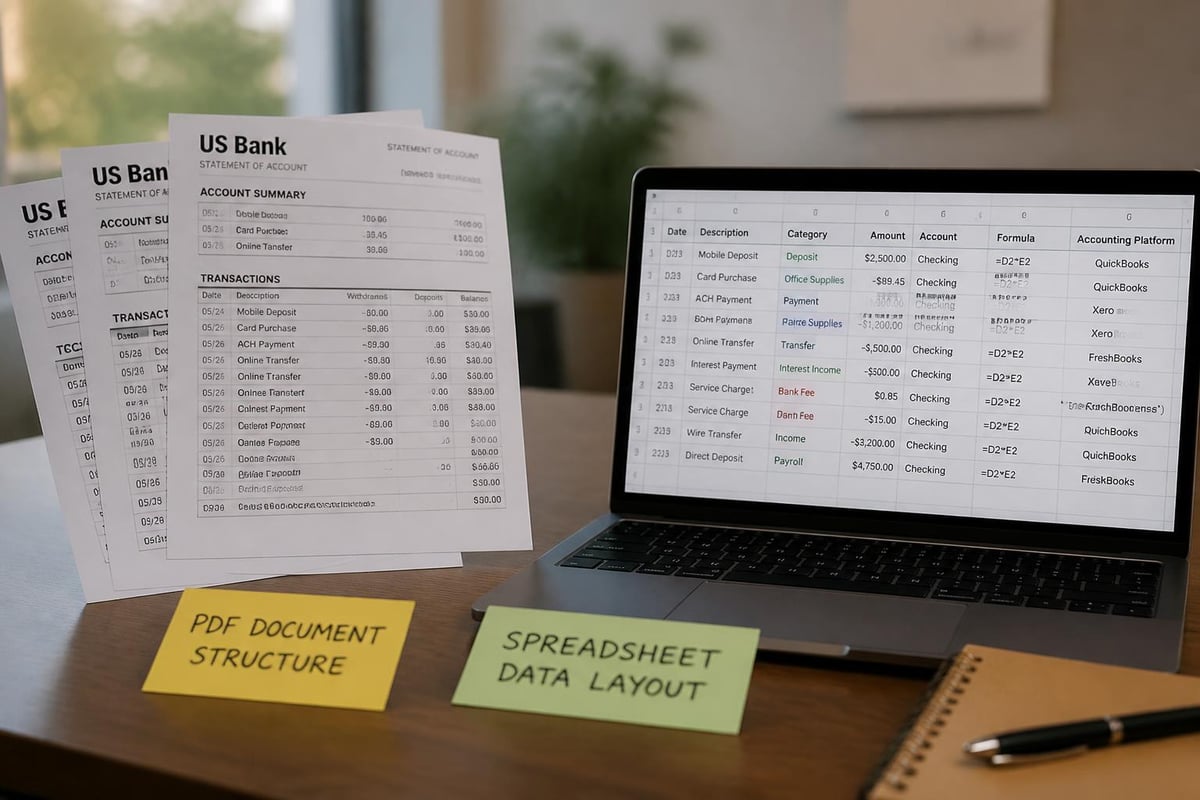
US Bank provides statements in PDF format as the standard option, but financial management often requires data in spreadsheet format. The PDF bank statement format preserves the official document appearance but limits data manipulation capabilities.
Working with PDF Statements
PDF statements serve well for record-keeping and sharing with third parties like lenders or auditors. The format maintains the official appearance and can't be easily altered, providing authenticity verification. However, when you need to analyze transactions, create budgets, or import data into accounting software, PDF limitations become apparent.
Converting your us bank bank statement from PDF to spreadsheet format enables deeper financial analysis. You can sort transactions by category, calculate spending totals, and integrate the data with budgeting tools or accounting platforms. Bank Statement Boss offers AI-powered conversion services that transform PDF statements into Excel-compatible spreadsheets with 99% accuracy, maintaining all transaction details while making the data fully manipulable.
CSV Export Capabilities
US Bank also offers CSV (comma-separated values) export options for transaction data through their online banking platform. This format provides raw transaction data that imports directly into spreadsheet applications and accounting software.
CSV files contain the essential transaction information but lack the formatted appearance of PDF statements. They're ideal for data analysis but don't serve well as official documentation. Many financial professionals maintain both formats: PDFs for official records and CSV or converted spreadsheets for analysis and accounting purposes.
Multiple Account Statement Management
Many US Bank customers maintain several accounts for different purposes, such as checking, savings, credit cards, and business accounts. Understanding how US Bank handles multi-account statements helps streamline your financial record management.
Combined vs. Separate Statements
By default, US Bank combines multiple accounts into a single statement when you hold several products with the bank. This consolidated approach reduces paper waste and provides a comprehensive view of your entire banking relationship.
However, combined statements can complicate record-keeping for some situations. Business owners who need to separate personal and business finances, or individuals managing accounts for different purposes, may prefer separate statements for each account.
You can request separate statements through your online banking preferences or by contacting customer service. This option ensures each account receives its own us bank bank statement, simplifying accounting processes and making it easier to share specific account information with relevant parties.
Statement Preferences and Delivery Options
US Bank allows you to customize how you receive statements across all your accounts. You can choose paperless delivery for some accounts while maintaining paper statements for others, depending on your specific needs.
Paperless statements typically become available earlier than mailed versions and reduce clutter while supporting environmental sustainability. The digital delivery option also ensures you never miss a statement due to mail delays or address changes.
Reading and Interpreting Statement Information
Beyond simply accessing your us bank bank statement, understanding how to read and interpret the information proves essential for effective financial management. Each section of your statement serves a specific purpose in documenting your financial activity.
Transaction Descriptions and Codes
Transaction descriptions on your us bank bank statement provide details about each activity, but the abbreviated format can sometimes make identification challenging. Debit card purchases often show the merchant name and location, while electronic transfers display the originating company name or description you provided.
Common transaction types include:
- ACH credits and debits: Automated electronic transfers
- Point-of-sale purchases: Debit card transactions
- ATM withdrawals: Cash withdrawals with location information
- Wire transfers: Incoming or outgoing electronic payments
- Check payments: Check number and cleared amount
- Mobile deposits: Remote check deposit transactions
Understanding these codes helps you quickly identify transaction types when reviewing your statement. If you notice unfamiliar transactions, the description provides the starting point for researching potential errors or fraudulent activity.
Balance Calculations and Verification
Your us bank bank statement shows both your available balance and your actual balance at the statement closing date. The statement ending balance should match your records if you've accurately tracked all transactions during the period.
Reconciling your statement involves comparing the bank's record against your own transaction log or accounting records. This process helps identify discrepancies, missed transactions, or errors that require correction. Understanding what a bank statement shows makes this reconciliation process more efficient and accurate.
Statement Security and Privacy Considerations
Your us bank bank statement contains sensitive financial information that requires protection. Understanding security best practices for handling statements prevents identity theft and fraud.
Digital Statement Security
When downloading and storing digital statements, implement strong security measures. Use password-protected folders or encrypted storage solutions for saved statement files. Avoid saving statements to unsecured cloud storage or shared drives where unauthorized users might access them.
Email presents particular risks for statement security. If you must email a us bank bank statement to your accountant or another authorized party, use secure file-sharing services rather than standard email attachments. Consider password-protecting PDF files before transmission.
Bank Statement Boss maintains bank-level security standards when processing your statements for conversion, ensuring your financial data remains protected throughout the transformation process.
Physical Statement Protection
For those who still receive paper statements, proper disposal becomes critical. Never discard statements in regular trash where they could be retrieved. Use a cross-cut shredder to destroy statements you no longer need to maintain, or take advantage of secure document destruction services.
Store physical statements in a secure location such as a locked filing cabinet or safe. This protection prevents unauthorized access and preserves your records from damage or loss.
Statement Uses for Financial Planning and Documentation
Your us bank bank statement serves purposes beyond simple transaction verification. These documents provide valuable data for budgeting, tax preparation, and financial planning activities.
Tax Preparation and Deduction Tracking
Business owners and self-employed individuals rely heavily on bank statements during tax preparation. Your us bank bank statement provides documentation for deductible expenses, income verification, and business activity tracking.
For optimal tax preparation efficiency, categorize transactions throughout the year rather than waiting until tax season. Converting statements to spreadsheet format enables easier categorization and subtotal calculations for different expense types. This organization simplifies the process of identifying deductible expenses and preparing accurate tax returns.
Loan Applications and Financial Verification
Lenders typically require several months of us bank bank statement records when evaluating loan applications. These statements verify your income, demonstrate financial stability, and help lenders assess your ability to repay borrowed funds.
Having organized, readily accessible statements streamlines the loan application process. Whether you're applying for a mortgage, business loan, or personal credit, providing clean, complete statements demonstrates financial responsibility and expedites approval decisions.

Budget Creation and Expense Analysis
Analyzing your us bank bank statement reveals spending patterns that inform budget creation and financial planning. By reviewing several months of statements, you identify recurring expenses, discretionary spending categories, and opportunities for cost reduction.
Spreadsheet conversion makes this analysis significantly easier. You can create pivot tables, generate spending charts, and calculate category totals that reveal exactly where your money goes each month. This data-driven approach to budgeting produces more realistic and achievable financial plans than estimation-based methods.
Addressing Statement Errors and Discrepancies
Despite sophisticated banking systems, errors occasionally appear on statements. Knowing how to identify and resolve these issues protects your finances and maintains accurate records.
Common Statement Issues
Review your us bank bank statement carefully each month for potential errors. Common issues include duplicate charges, incorrect transaction amounts, unauthorized transactions, and missing deposits or credits. Early detection of these problems simplifies the resolution process and limits potential financial impact.
Understanding what appears on your statement helps you identify legitimate transactions versus potential errors. Familiarize yourself with your typical transaction patterns so unusual activity stands out during review.
Dispute Resolution Process
When you identify an error on your us bank bank statement, contact the bank promptly. Federal regulations provide specific timeframes for reporting unauthorized transactions, with stronger protections for quickly reported issues.
Document all communications with the bank regarding statement disputes. Save correspondence, note phone conversation details, and retain copies of disputed transactions. This documentation proves valuable if the resolution process becomes complicated or requires escalation.
Integrating Statements into Accounting Workflows
For business owners and accounting professionals, efficient us bank bank statement processing forms a critical component of financial management. Streamlining this process saves time and improves accuracy.
Monthly Reconciliation Best Practices
Establish a consistent schedule for downloading and reconciling your us bank bank statement. Many businesses perform reconciliation within the first week after statement availability, ensuring timely identification of discrepancies while transactions remain fresh in memory.
Create a standardized reconciliation checklist that ensures you review all critical statement elements consistently each month. This systematic approach prevents overlooked transactions and maintains accounting accuracy.
Accounting Software Integration
Modern accounting platforms accept bank statement data in various formats. Converting bank statements to Excel or CSV format enables direct import into QuickBooks, Xero, and other accounting systems, eliminating manual data entry and reducing transcription errors.
When selecting statement conversion tools, prioritize accuracy and security. The conversion process should maintain all transaction details while formatting data appropriately for your specific accounting platform. Integration capabilities save substantial time during monthly closing processes and improve overall accounting efficiency.
Understanding how to access, manage, and utilize your us bank bank statement effectively forms the foundation of sound financial management. Whether you need statements for personal budgeting, business accounting, tax preparation, or loan applications, knowing the available formats and access methods ensures you have the documentation you need when you need it. For those seeking to maximize the utility of their financial data, Bank Statement Boss transforms PDF statements into analysis-ready spreadsheets with AI-powered accuracy, streamlining your workflow while maintaining bank-level security for your sensitive information.