
Managing financial documents has become increasingly digital, with the bank pdf statement serving as the primary method for financial institutions to deliver account information. These electronic documents have largely replaced paper statements, offering convenience and accessibility while introducing new challenges around security, storage, and data extraction. Understanding how to properly handle, secure, and utilize bank PDF statements is essential for individuals, businesses, and accounting professionals navigating the modern financial landscape.
Understanding Bank PDF Statement Formats
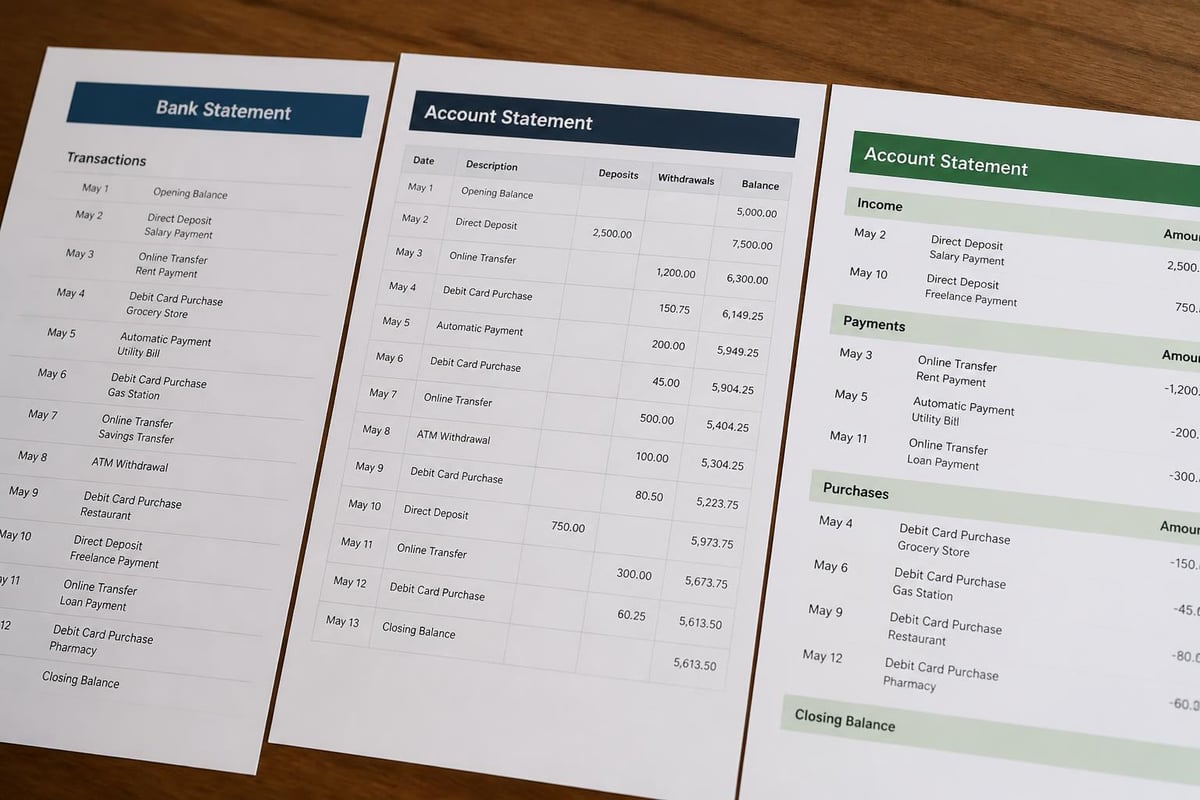
Financial institutions generate bank PDF statements in various formats, each designed to present account activity, balances, and transaction details. The standardization of these documents varies significantly across banks, credit unions, and other financial service providers.
Most statements follow a consistent structure that includes account holder information, statement period dates, beginning and ending balances, and a detailed transaction ledger. However, the visual layout, fonts, and data organization differ substantially between institutions.
Common PDF Statement Structures
Banks typically organize their PDF statements using one of several layout approaches:
- Single-column format with transactions listed chronologically
- Multi-column tables showing date, description, debit, credit, and balance
- Categorized sections grouping transactions by type (deposits, withdrawals, fees)
- Summary pages followed by detailed transaction pages
- Embedded images for check copies or deposit receipts
The lack of universal standardization creates challenges when attempting to extract data programmatically. Each bank's unique formatting requires different parsing approaches, making PDF bank statement to spreadsheet conversion a complex technical challenge that benefits from AI-powered solutions.
Security Features in Modern Statements
Financial institutions incorporate multiple security elements into their PDF statements to prevent fraud and unauthorized access. Password protection represents the most common security measure, typically using the last four digits of an account number or a custom PIN.
| Security Feature | Purpose | Implementation Level |
|---|---|---|
| Password encryption | Prevent unauthorized access | 95% of institutions |
| Watermarks | Identify authentic documents | 60% of institutions |
| Digital signatures | Verify document integrity | 40% of institutions |
| Metadata tracking | Audit document handling | 30% of institutions |
Understanding PDF security best practices helps ensure that sensitive financial information remains protected throughout its lifecycle. Banks employ AES-256 encryption for most secured statements, providing robust protection against unauthorized access.
Accessing and Downloading Your Bank PDF Statement
Most financial institutions offer multiple channels for accessing PDF statements, with online banking portals serving as the primary distribution method. Customers can typically download statements dating back several years, though retention periods vary by institution.
The download process generally requires authentication through username, password, and often multi-factor verification. Once logged in, customers navigate to a statements or documents section where they can select specific periods and download individual files.
Mobile Banking Statement Access
Mobile applications have streamlined statement access, allowing users to retrieve documents directly from smartphones or tablets. These apps often include features like:
- Push notifications when new statements become available
- Biometric authentication (fingerprint or facial recognition)
- Direct sharing to email or cloud storage
- In-app PDF viewers with zoom and search capabilities
Some institutions limit statement retention in mobile apps to conserve device storage, requiring users to access full archives through web interfaces. Understanding these limitations helps users develop effective document management strategies for their financial records.
Converting Bank PDF Statements to Usable Data
The transition from PDF format to structured data represents a significant challenge for businesses and individuals managing multiple accounts. Traditional methods like manual data entry consume substantial time and introduce human error risks.
Manual Conversion Challenges
Attempting to manually transcribe transaction data from a bank pdf statement into spreadsheets presents numerous obstacles:
- Time consumption averaging 15-30 minutes per statement
- Transcription errors affecting 2-5% of entries
- Difficulty handling multi-page statements with hundreds of transactions
- Formatting inconsistencies requiring constant adjustments
- Lack of automation for recurring monthly processes
Financial advisors and businesses requiring regular statement analysis often turn to advertising and marketing services like those offered by Ryan Cook to promote automated solutions that reduce this administrative burden.
Automated Conversion Technologies
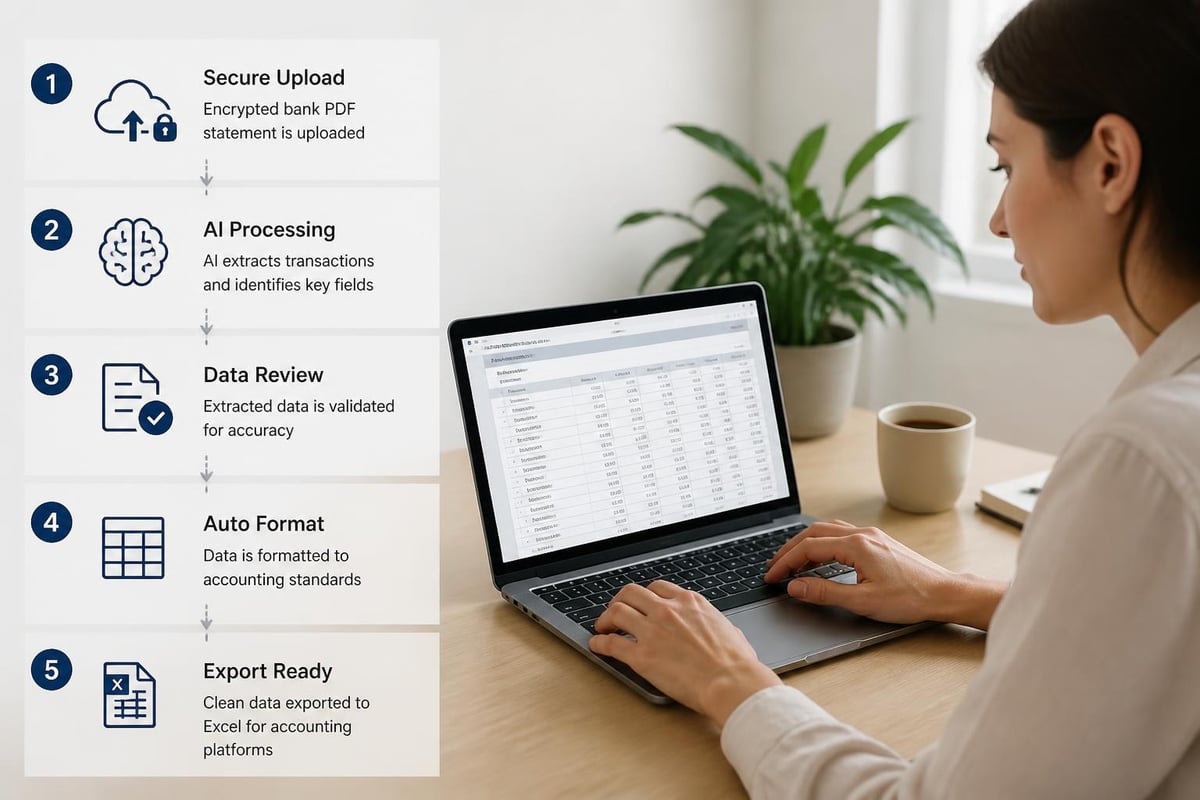
Modern AI-powered systems have revolutionized bank PDF statement processing by employing optical character recognition (OCR) and machine learning algorithms. These technologies identify text, numerical data, and table structures regardless of the source bank's formatting.
The conversion process typically involves:
- Document upload to a secure processing environment
- Format detection identifying the bank and statement type
- Data extraction using trained AI models
- Validation checking for accuracy and completeness
- Export to Excel, CSV, or accounting platform formats
Advanced systems achieve accuracy rates exceeding 99%, dramatically reducing the need for manual verification. These tools recognize various transaction types, categorize expenses, and maintain proper debit/credit accounting conventions.
Security Considerations When Handling Bank PDF Statements
Financial statements contain highly sensitive personal and business information, making security paramount throughout their lifecycle. Understanding the risks of sharing bank statements helps individuals and businesses implement appropriate safeguards.
Storage Best Practices
Proper storage of bank PDF statements requires a multi-layered approach addressing both physical and digital security concerns. Cloud storage solutions offer convenience but must include encryption both in transit and at rest.
Recommended storage practices include:
- Encrypted cloud services with zero-knowledge architecture
- Local encrypted drives for offline backup copies
- Access controls limiting who can view or modify files
- Regular backups to multiple locations
- Retention policies aligning with tax and legal requirements
Many businesses maintain three-month bank statement collections for loan applications, audits, or financial planning purposes, requiring organized archival systems that balance accessibility with security.
Protecting Statements During Transmission
When sharing bank PDF statements with accountants, lenders, or other third parties, transmission security becomes critical. Email represents a particularly vulnerable method due to its lack of default encryption.
Secure transmission methods include:
- Password-protected PDFs sent separately from passwords
- Encrypted file transfer services with expiration dates
- Secure portal uploads provided by receiving organizations
- Virtual data rooms for multiple document exchanges
The increasing threat of fake bank statements underscores the importance of verification processes for recipients, who should implement authentication measures to confirm document legitimacy.
Redacting Sensitive Information from Bank Statements
Certain situations require sharing bank PDF statements while protecting specific sensitive details. Loan applications might need transaction history without revealing exact account numbers, or business partnerships may require proof of revenue without disclosing proprietary vendor relationships.
Professional redaction of bank statements involves permanently removing information rather than simply covering it with black boxes that can be digitally removed. Proper redaction tools modify the underlying PDF structure, ensuring deleted information cannot be recovered.
Information Commonly Requiring Redaction
Different scenarios call for redacting various data elements:
| Scenario | Information to Redact | Information to Preserve |
|---|---|---|
| Mortgage application | Full account numbers | Last 4 digits, balances |
| Business sale | Proprietary vendor names | Payment amounts, dates |
| Legal proceedings | Unrelated transactions | Specific case-relevant items |
| Partnership disclosure | Personal expenses | Business income/expenses |
When handling credit card bank statements, additional considerations apply as these documents often contain merchant category codes and detailed purchase descriptions requiring careful review before sharing.

Accessibility Requirements for Bank PDF Statements
Financial institutions face legal obligations to provide accessible bank PDF statements that users with disabilities can effectively utilize. The IRS accessibility standards and ADA requirements for financial documents establish baseline expectations for document structure and formatting.
Key Accessibility Features
Accessible PDF statements include technical elements that assistive technologies can interpret:
- Tagged PDF structure defining headings, paragraphs, and tables
- Alt text for images, logos, and graphical elements
- Logical reading order ensuring screen readers follow intended flow
- Sufficient color contrast for users with visual impairments
- Searchable text rather than scanned images
Many older bank PDF statements fail accessibility tests, creating barriers for individuals relying on screen readers or other assistive technologies. Financial institutions have gradually improved compliance, though research on PDF accessibility reveals persistent challenges across the industry.
Integration with Accounting Platforms
Modern accounting and bookkeeping workflows depend on efficiently importing bank transaction data into platforms like QuickBooks, Xero, FreshBooks, and Wave. The bank pdf statement serves as the source document, but manual entry creates bottlenecks.
Direct bank feeds offer real-time transaction imports but come with limitations:
- Not available from all financial institutions
- Often require monthly fees from accounting platforms
- Limited historical data (typically 90 days)
- Occasional connection failures requiring troubleshooting
- Privacy concerns about continuous account access
For businesses managing bank statement details and formats, PDF conversion bridges the gap between institutions without direct feeds and those requiring historical imports beyond standard windows.
Conversion Format Requirements
Different accounting platforms accept transaction imports in specific formats with varying column requirements:
QuickBooks Online expects CSV files containing date, description, and amount columns with specific date formatting (MM/DD/YYYY). The platform distinguishes debits and credits through positive and negative number conventions.
Xero accepts CSV or OFX files with flexible column mapping, allowing users to specify which columns contain dates, payees, references, and amounts during the import process.
Wave Accounting requires CSV files with separate debit and credit columns, allowing blank cells in the unused column for each transaction.
Understanding these platform-specific requirements ensures smooth bank statement to Excel conversions that import without errors or data corruption. Professional conversion services automatically format output files to match destination platform specifications.
Document Verification and Fraud Prevention
The digital nature of bank PDF statements creates opportunities for manipulation and fraud. Research on PDF steganography and hidden data demonstrates how seemingly legitimate documents can contain concealed alterations.
Lenders, landlords, and business partners receiving statements should implement verification procedures:
- Request direct bank delivery when possible
- Verify metadata checking creation dates and software
- Examine formatting consistency throughout the document
- Cross-reference multiple months for pattern consistency
- Contact issuing institutions to confirm balances and transactions
Businesses with security-focused operations employ advanced verification tools that analyze PDF structure, detect modifications, and flag suspicious inconsistencies. These automated systems compare documents against known bank formatting patterns, identifying potential forgeries.
Common Fraud Indicators
Altered bank PDF statements often exhibit telltale signs that trained reviewers can identify:
- Font inconsistencies between sections
- Alignment issues in transaction tables
- Mathematical errors in running balances
- Metadata showing recent creation dates for old statements
- Resolution differences between document sections
- Missing or altered security features
Financial professionals should maintain awareness of these indicators while recognizing that sophisticated forgeries may require technical analysis tools for detection.
Managing Multi-Account Statement Collections
Individuals and businesses with multiple bank accounts, credit cards, and investment accounts face organizational challenges when managing dozens of monthly PDF statements. Without systematic approaches, retrieving specific documents becomes time-consuming and frustrating.
Effective management strategies include:
- Consistent naming conventions (YYYY-MM-BankName-AccountType-Last4Digits.pdf)
- Hierarchical folder structures organized by year, then institution
- Centralized storage location rather than scattered across devices
- Regular download schedules preventing gaps in collections
- Backup redundancy protecting against data loss
Businesses requiring regular answers to banking questions benefit from documented procedures ensuring all team members follow consistent statement management protocols.
Retention Period Considerations
Different stakeholders have varying bank pdf statement retention requirements:
| Stakeholder | Typical Retention Period | Primary Purpose |
|---|---|---|
| Individual taxpayers | 3-7 years | IRS audit protection |
| Small businesses | 7 years | Tax and legal compliance |
| Public companies | Indefinite | Regulatory requirements |
| Mortgage applicants | 2-3 months recent | Loan qualification |
Understanding applicable retention requirements prevents premature deletion of documents that may later prove necessary for audits, legal proceedings, or financial applications. Cloud storage economics have made indefinite retention increasingly practical for most users.
Batch Processing Multiple Bank PDF Statements
Organizations handling high volumes of statements benefit from batch processing capabilities that handle multiple documents simultaneously. Accounting firms, property management companies, and financial advisors often process dozens or hundreds of statements monthly.
Batch processing workflows typically involve:
- Collecting statements from clients or multiple accounts
- Organizing files into processing queues
- Running automated conversion across all documents
- Quality checking outputs for accuracy
- Distributing results to appropriate destinations
Advanced systems recognize different bank formats within mixed batches, applying appropriate parsing rules to each document without manual intervention. This capability dramatically reduces processing time compared to handling statements individually.
Quality Control in High-Volume Processing
When processing large statement batches, quality assurance becomes critical. Automated systems should flag:
- Documents failing OCR confidence thresholds
- Transaction count mismatches between pages
- Balance calculation discrepancies
- Format recognition failures
- Encryption or password protection issues
Implementing systematic quality controls ensures that the small percentage of statements requiring manual review receive attention while the majority flow through automated pipelines efficiently. Reviewing checking statements from various institutions helps identify patterns in processing challenges.
Privacy Compliance in Statement Handling
Organizations processing bank PDF statements on behalf of clients must navigate complex privacy regulations including GDPR, CCPA, and financial industry-specific requirements. Security best practices research provides frameworks applicable to sensitive financial document handling.
Data Minimization Principles
Privacy-conscious operations should:
- Process only necessary data elements
- Delete source documents after conversion when appropriate
- Limit human access to automated systems where possible
- Encrypt data throughout processing pipelines
- Maintain detailed audit logs of document handling
Service providers should clearly communicate data handling practices, retention periods, and security measures to clients entrusting them with sensitive financial information. Transparency builds trust and ensures compliance with disclosure requirements.
API Integration for Automated Statement Processing
Technical teams building financial applications increasingly require programmatic access to bank PDF statement conversion capabilities. API-driven workflows enable seamless integration between banking data sources and downstream applications.
Modern conversion APIs typically offer:
- RESTful endpoints accepting PDF uploads
- Webhook notifications when processing completes
- Multiple output format options (JSON, CSV, Excel)
- Confidence scoring for OCR results
- Error handling for unsupported formats
Developers can review detailed API documentation and integration examples to implement automated workflows that trigger conversion upon statement receipt, route results to appropriate systems, and handle exceptions gracefully.
Managing bank PDF statements effectively requires balancing accessibility, security, and usability across diverse use cases from individual tax preparation to enterprise accounting workflows. The challenges of extracting usable data from varied formats, protecting sensitive information, and maintaining compliance with accessibility and privacy requirements demand sophisticated approaches. Bank Statement Boss addresses these challenges through AI-powered conversion technology that transforms PDF bank and credit card statements into spreadsheet formats with 99% accuracy, compatible with major accounting platforms while maintaining bank-level security for your financial data.