
Managing your finances effectively starts with understanding the documents your financial institution provides. For customers of Up Bank, Australia's popular digital-first banking platform, accessing and interpreting your up bank statement is essential for tracking spending, maintaining budgets, and ensuring financial accuracy. This guide explores everything you need to know about obtaining, reading, and utilizing your Up banking records in 2026.
Understanding Up Bank Statements
An up bank statement serves as your official record of all transactions, balances, and account activity within a specific period. Unlike traditional banks that mail paper statements monthly, Up delivers digital-first solutions that align with modern financial management needs.
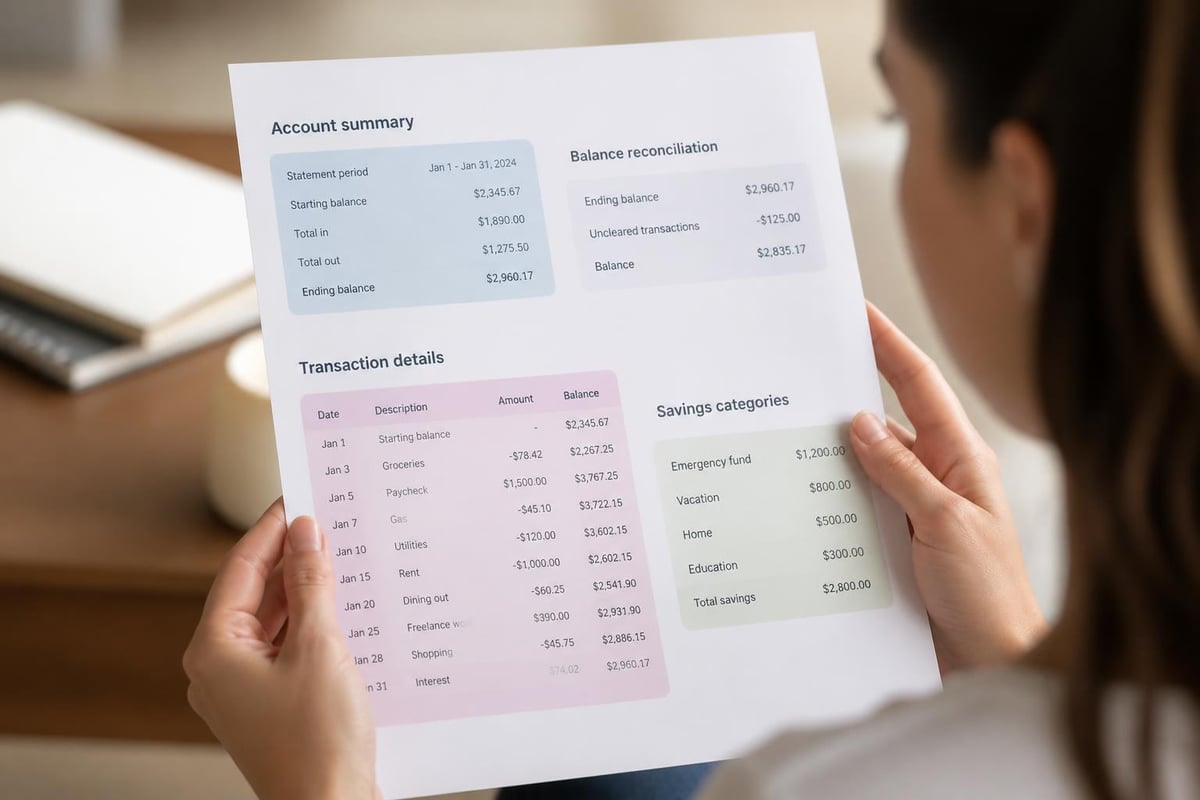
Understanding what constitutes a bank statement helps you recognize the critical information these documents contain. Up bank statements include your opening and closing balances, detailed transaction histories, interest earned on savings, and any fees charged to your account. Since Up operates entirely through its mobile application, these statements reflect the same transaction categorization and spending insights you see daily in the app.
Key Components of Your Up Statement
Every up bank statement contains standardized elements that help you track your financial activity:
- Account holder information including your name and account number
- Statement period dates showing the start and end of the reporting cycle
- Opening and closing balances demonstrating your account's financial position
- Detailed transaction list with dates, descriptions, and amounts
- Summary totals for deposits, withdrawals, and net changes
- Interest calculations for savings accounts and categorized spending
The digital nature of Up means your statement also integrates seamlessly with the platform's unique features like "Savers" sub-accounts and automated budgeting tools.
How to Access Your Up Bank Statement
Obtaining your up bank statement requires navigating the Up mobile application, which serves as your primary banking interface. The process is straightforward and designed for quick access whenever you need financial documentation.
Step-by-Step Access Process
- Open the Up mobile app on your iOS or Android device
- Navigate to your account by selecting the specific Up account or Saver
- Tap the settings or more options icon typically found in the upper corner
- Select "Statements" or "Export" from the available menu options
- Choose your desired date range for the statement period
- Download or share the PDF directly to your email or cloud storage
Up provides statements in PDF format, which maintains formatting consistency across devices and platforms. According to Up Bank's support resources, users can access statements dating back to their account opening, ensuring complete transaction history availability.
Digital Statement Advantages
Up's digital approach offers several benefits compared to traditional paper statements:
| Feature | Up Digital Statements | Traditional Paper Statements |
|---|---|---|
| Access Speed | Instant download | 5-10 business days mail delivery |
| Cost | Free unlimited access | Often charged per copy |
| Storage | Cloud-based, searchable | Physical filing required |
| Environmental Impact | Zero paper waste | Significant paper consumption |
| Customization | Flexible date ranges | Fixed monthly periods |
This digital-first approach aligns with Up's commitment to modern banking practices while providing users greater control over their financial documentation.
Reading and Interpreting Transaction Details
Your up bank statement presents transactions in a format designed for clarity and quick comprehension. Each entry includes specific details that help you understand exactly where your money goes.
The transaction description field typically contains merchant names, payment methods, and sometimes location data. Up's intelligent categorization system automatically groups expenses into categories like "Transport," "Groceries," or "Entertainment," which appears both in your app and on your statement.
Understanding Transaction Codes
Different transaction types appear with specific identifiers:
- EFTPOS for point-of-sale purchases
- BPAY for bill payments
- Direct Debit for authorized recurring payments
- Bank Transfer for person-to-person or business transfers
- ATM Withdrawal for cash withdrawals
- Interest Credit for earned interest on savings
Learning to read bank statements effectively ensures you can identify each transaction type and verify accuracy. This skill becomes particularly valuable when reconciling your records with accounting software or preparing financial documentation for tax purposes.
Common Uses for Up Bank Statements
Your up bank statement serves multiple purposes beyond simple record-keeping. Financial institutions, government agencies, and service providers frequently request these documents as proof of income, residence, or financial stability.
Professional and Legal Applications
Loan applications represent one of the most common scenarios requiring bank statements. Lenders examine your up bank statement to assess income stability, spending patterns, and creditworthiness before approving mortgages, car loans, or personal loans.
Visa and immigration processes often demand several months of bank statements to demonstrate financial capacity. Your up bank statement provides immigration officials with evidence of sufficient funds to support yourself during travel or relocation.
Tax preparation benefits significantly from organized banking records. The multiple purposes of bank statements include supporting tax deductions, verifying business expenses, and providing audit trails for financial claims.

Personal Financial Management
Beyond external requirements, your up bank statement supports personal financial goals:
- Tracking progress toward savings targets
- Identifying subscription services or recurring charges
- Detecting unauthorized transactions or potential fraud
- Creating accurate household budgets
- Monitoring spending trends across categories
- Reconciling accounts with partner or family member transactions
The detailed categorization in your up bank statement makes expense analysis significantly easier than manually sorting through generic transaction lists.
Converting Up Statements for Accounting Software
Many businesses and individuals need their up bank statement data in spreadsheet format for accounting purposes. While Up provides statements as PDFs, converting bank PDFs to Excel enables easier manipulation, analysis, and integration with financial management tools.
Professional PDF bank statement to spreadsheet conversion services use AI technology to extract transaction data with high accuracy, transforming your up bank statement into formats compatible with QuickBooks, Xero, or other accounting platforms. This conversion process maintains data integrity while making information more accessible for financial analysis.
Reconciliation and Record-Keeping
Regular statement review helps maintain accurate financial records. Comparing your up bank statement against your personal records or business accounting books ensures no transactions are missed or duplicated.
Monthly reconciliation best practices include:
- Download your up bank statement on the same day each month
- Compare statement transactions against your receipts or app records
- Verify all deposits match expected income sources
- Confirm withdrawal amounts align with authorized purchases
- Investigate any discrepancies immediately
- Document reconciliation results for future reference
This systematic approach prevents small errors from compounding into significant financial issues. Understanding bank statement formats across different institutions helps if you maintain accounts with multiple banks.
Security and Privacy Considerations
Your up bank statement contains sensitive financial information requiring careful protection. Understanding security best practices prevents identity theft, fraud, and unauthorized access to your banking data.
Protecting Digital Statements
Secure storage is essential when maintaining digital copies of your up bank statement. Use encrypted cloud storage services with strong password protection rather than leaving files in unsecured email accounts or desktop folders.
Sharing precautions matter when providing statements to third parties. Only share your up bank statement with verified, legitimate entities. When emailing statements, use encrypted services or password-protected PDFs to prevent interception.
Up Bank implements bank-level security measures including two-factor authentication and biometric login options. However, your responsibility extends to protecting downloaded statements once they leave the platform's secure environment.
Fraud Detection Through Statement Review
Regular examination of your up bank statement helps identify fraudulent activity early:
| Red Flag | What to Look For | Action Required |
|---|---|---|
| Unfamiliar merchants | Transactions you don't recognize | Contact Up immediately |
| Duplicate charges | Same amount/merchant multiple times | Dispute with merchant and bank |
| Round-number withdrawals | Unusual $50, $100 amounts | Check for skimming devices |
| Foreign transactions | Charges from unexpected countries | Freeze card, report fraud |
| Micro-transactions | Small test charges under $2 | Sign of compromised card details |
Up's real-time transaction notifications provide immediate alerts, but your monthly up bank statement serves as a comprehensive verification tool. Detecting fraud through bank statements represents a critical financial protection strategy.

Obtaining Statements for Past Periods
Sometimes you need historical banking records beyond what's immediately accessible in the Up app. Getting bank statements from your financial institution follows specific procedures that vary by bank.
For Up customers, historical statements remain accessible through the mobile app indefinitely. This differs from traditional banks that may charge fees for statements older than seven years or require special requests for archived records.
Requesting Certified Statements
Certain official purposes require certified or stamped statements rather than standard downloads. While Up primarily operates digitally, they can provide verified documentation when legally necessary.
Situations requiring certified statements include:
- Court proceedings or legal disputes
- International visa applications
- Mortgage applications with strict verification requirements
- Government benefit claims
- Estate settlement and probate processes
Contact Up's support team directly for certified statement requests, as these typically require additional processing time compared to standard digital downloads.
Statement Frequency and Timing
Up generates your up bank statement records on a monthly cycle, aligning with standard banking practices. However, the digital nature of the platform means you can generate custom date ranges whenever needed.
Custom Date Ranges
Unlike traditional monthly statements, Up allows you to create statements for specific periods:
- Weekly statements for detailed budget tracking
- Quarterly reports for tax planning
- Annual summaries for year-end financial reviews
- Custom periods matching pay cycles or project timelines
This flexibility supports various financial management strategies and accommodates different accounting requirements. Freelancers and business owners particularly benefit from aligning statement periods with invoice cycles or tax quarters.
Integration with Financial Planning Tools
Your up bank statement provides raw data that becomes valuable when integrated with broader financial planning strategies. The categorized spending information transfers effectively to budgeting applications and expense tracking tools.
Popular integration methods include:
- Manually importing transaction data from converted spreadsheets
- Using Up's "Export" feature to create CSV files for budget apps
- Photographing statement summaries for visual budget journals
- Cross-referencing statement categories with planned budget allocations
Checking statements regularly establishes healthy financial habits and ensures your budget reflects actual spending patterns rather than estimates.
Troubleshooting Common Statement Issues
Occasionally, you might encounter problems accessing or interpreting your up bank statement. Understanding common issues and solutions saves time and reduces frustration.
Missing transactions sometimes appear due to processing delays. Pending transactions may not show on statements until fully cleared, typically within 1-3 business days. If transactions remain missing after clearing, contact Up support immediately.
Incorrect categorization can occur when merchants use unclear billing descriptors. While Up's AI generally categorizes accurately, you can manually adjust categories in the app, though this won't retroactively change printed statements.
Download errors might stem from app version issues or connectivity problems. Ensure your Up app is updated to the latest version and try downloading via stable Wi-Fi rather than cellular data.
Regulatory Compliance and Statement Requirements
Financial institutions must comply with banking regulations regarding statement provision and record retention. Up adheres to Australian banking standards while leveraging digital delivery methods.
Regulatory requirements mandate that banks:
- Provide account holders with regular statement access
- Maintain transaction records for minimum specified periods
- Ensure statement accuracy and completeness
- Protect customer data privacy
- Allow customers to dispute errors within defined timeframes
Your up bank statement meets these requirements while offering enhanced accessibility compared to paper-based systems. Bank statement definitions and uses help consumers understand their rights and banks' obligations regarding financial documentation.
Environmental and Cost Benefits
Choosing digital statements through Up contributes to environmental sustainability while eliminating costs associated with paper banking. Traditional paper statements consume significant resources in production, printing, and postal delivery.
Environmental impact comparison:
| Aspect | Digital Statements | Paper Statements |
|---|---|---|
| Paper consumption | Zero | 4-8 pages monthly per account |
| Carbon footprint | Minimal server energy | Printing, transport emissions |
| Physical storage | None required | Filing space needed |
| Disposal concerns | No waste | Shredding/recycling required |
By accessing your up bank statement digitally, you participate in sustainable banking practices while maintaining complete financial documentation access.
Managing your financial records effectively requires understanding how to access, interpret, and utilize your banking documentation. Your up bank statement provides comprehensive transaction details, balance information, and spending insights essential for personal financial management and professional requirements. When you need to convert PDF statements into usable spreadsheet formats for accounting purposes, Bank Statement Boss offers AI-powered conversion with 99% accuracy, transforming your banking records into formats compatible with major accounting platforms while maintaining bank-level security throughout the process.