

Every bookkeeper, accountant, and small business owner has faced the same tedious ritual: downloading a PDF bank statement, squinting at rows of transactions, and manually retyping them into a spreadsheet or accounting platform. It's slow, error-prone, and completely unnecessary in 2026. Transaction data extraction software now handles this job in seconds, converting raw PDF statements into structured, categorized data ready for QuickBooks, Xero, Sage, or Excel.
This article explains how transaction data extraction software works, what to look for when choosing a tool, and how to implement it into your existing accounting workflow — without sacrificing accuracy or security.
What Is Transaction Data Extraction Software?
Transaction data extraction software is a specialized tool that reads financial documents — typically PDF bank or credit card statements — and converts the unstructured text and tables inside them into structured, usable data formats like CSV, XLSX, or JSON. Instead of manually copying dates, descriptions, and amounts line by line, the software identifies these fields automatically using a combination of optical character recognition (OCR), pattern recognition, and increasingly, machine learning models trained specifically on financial document layouts.
The best tools go beyond simple text extraction. They understand the structure of a bank statement: separating deposits from withdrawals, identifying running balances, flagging duplicate entries, and even mapping transactions to standard accounting categories. This is the difference between a basic PDF-to-text converter and true transaction data extraction software built for accounting use cases.
Platforms like bankstatementboss.com are purpose-built for this exact problem — taking a stack of PDF statements from any bank and turning them into clean spreadsheets formatted for direct import into accounting software, cutting what used to take hours down to minutes.
Why Manual Data Entry No Longer Makes Sense
For decades, manual transcription was the default. But as transaction volumes grow and client expectations shift toward real-time financial visibility, manual entry has become a liability rather than just an inconvenience.
Consider the hidden costs of doing this by hand:
- Time drain: A single multi-page statement can take 20–40 minutes to transcribe accurately.
- Error rates: Manual data entry has documented error rates between 1% and 4%, according to research compiled by the Data Entry industry benchmarks, which can compound across hundreds of transactions.
- Opportunity cost: Hours spent on transcription are hours not spent on advisory work, client relationships, or growing the business.
- Inconsistent formatting: Different banks format statements differently, making standardization difficult without automated tools.
- Burnout risk: Repetitive, detail-heavy work is a common contributor to bookkeeper fatigue during tax season.
The American Institute of CPAs has repeatedly highlighted automation as a top priority for accounting firms looking to scale without proportionally scaling headcount. Transaction data extraction software directly addresses this by removing the most repetitive, lowest-value task in the bookkeeping workflow.
How Transaction Data Extraction Software Works
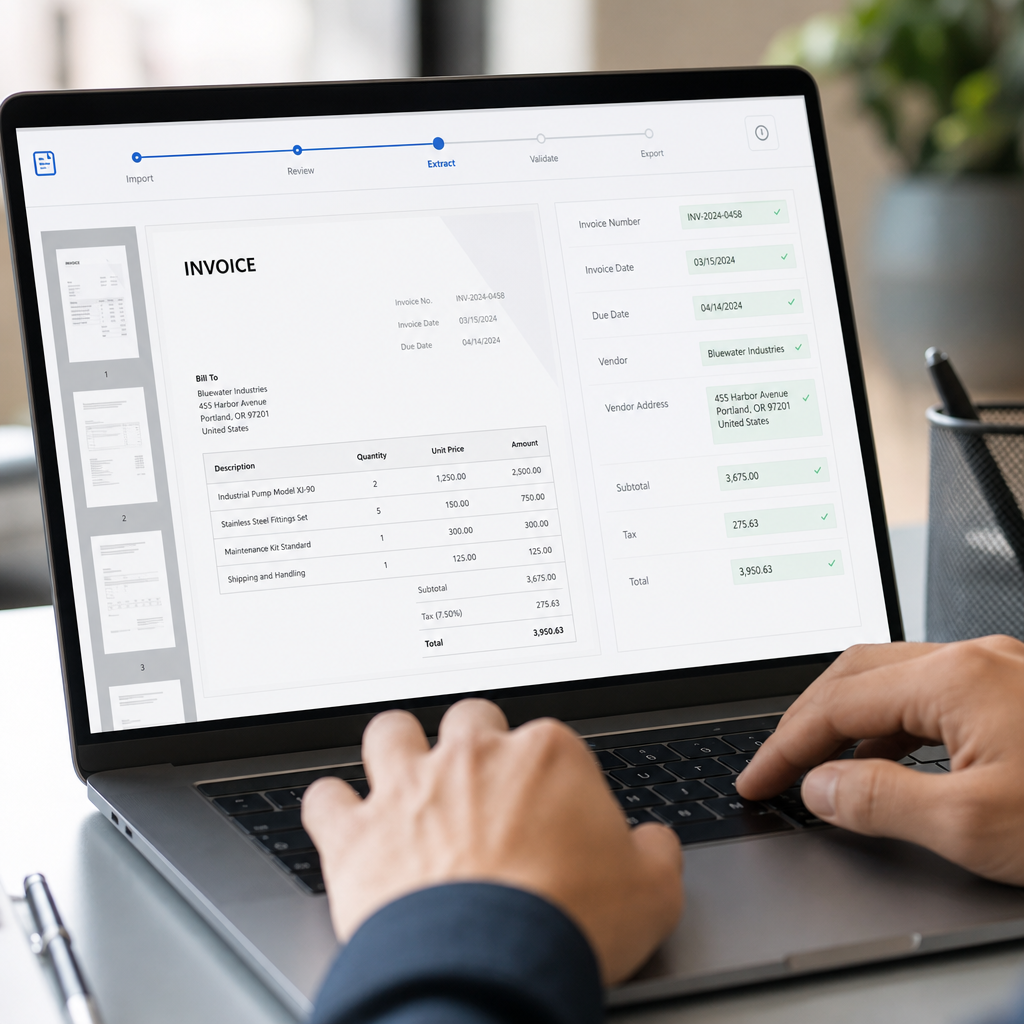
Understanding the mechanics helps when evaluating different tools. Most modern extraction platforms follow a similar pipeline:
- Document ingestion — The PDF statement is uploaded, either manually or via API/batch upload.
- OCR and layout analysis — The software scans the document, including scanned image-based PDFs, and detects tables, columns, and text blocks.
- Field recognition — Algorithms identify dates, transaction descriptions, amounts, and balances, even when formatting varies across banks.
- Data structuring — Recognized fields are mapped into rows and columns, forming a clean table.
- Validation and error-checking — Running balances are cross-checked against transaction totals to catch misreads.
- Export formatting — Data is output in a format compatible with accounting software, such as a QuickBooks-ready CSV or a Xero bank feed template.
Some platforms, including Bank Statement Boss, also offer API access for firms that want to embed extraction directly into their own internal tools or client portals, enabling fully automated pipelines from document receipt to ledger entry.
Key Features to Look for in Extraction Software
Not all tools are created equal. When evaluating transaction data extraction software, prioritize these capabilities:
- Multi-bank compatibility: Support for statements from major banks and credit unions, including varying layouts and currencies.
- High OCR accuracy: Especially important for scanned or low-resolution PDFs.
- Accounting software formatting: Direct export templates for QuickBooks, Xero, Sage, or Excel.
- Security and compliance: Encryption in transit and at rest, with clear data retention policies.
- Batch processing: The ability to upload and convert multiple statements at once.
- API access: For firms wanting to automate recurring workflows.
- Category mapping: Automatic tagging of transactions into expense or income categories.
- Error flagging: Highlighting unclear or low-confidence extractions for manual review.
A tool that checks most or all of these boxes will meaningfully reduce bookkeeping overhead rather than simply shifting the work from typing to formatting.
Comparing Extraction Methods
There are several approaches to digitizing transaction data, each with different tradeoffs in speed, accuracy, and cost.
| Method | Speed | Accuracy | Cost | Best For |
|---|---|---|---|---|
| Manual data entry | Very slow | Low–Medium (human error) | Low tool cost, high labor cost | Very small volumes |
| Generic PDF-to-Excel converters | Fast | Medium (poor table recognition) | Low | Simple, non-financial PDFs |
| Bank-provided CSV/OFX export | Fast | High | Free | Banks that support direct export |
| Dedicated transaction extraction software | Very fast | High (purpose-built models) | Subscription-based | Recurring bookkeeping, multiple clients |
| Outsourced data entry services | Slow–Medium | Medium | High (per hour/page) | One-off or irregular needs |
As the table shows, dedicated transaction data extraction software like Bank Statement Boss consistently outperforms generic tools on both speed and accuracy, particularly when dealing with multiple banks and inconsistent statement formats — a common reality for bookkeepers managing several clients.
Comparing Popular Export Formats for Accounting Platforms
Choosing the right output format matters just as much as the extraction itself. Here's how common formats stack up for compatibility with major accounting platforms:
| Format | QuickBooks | Xero | Sage | Excel/Generic Use |
|---|---|---|---|---|
| CSV (standard) | Supported with mapping | Supported with mapping | Supported with mapping | Fully compatible |
| QBO/QFX | Native import | Not supported | Not supported | Limited |
| OFX | Supported | Supported | Supported | Limited |
| XLSX | Manual import | Manual import | Manual import | Fully compatible |
| JSON (API) | Via integration | Via integration | Via integration | Developer use |
Good transaction data extraction software should let you choose the export format based on your destination platform rather than forcing a one-size-fits-all file. This flexibility is particularly valuable for bookkeepers who serve clients using different accounting systems, since it eliminates the need for separate conversion tools per platform.
Security and Compliance Considerations
Bank statements contain some of the most sensitive data a business handles — account numbers, balances, and full transaction histories. Before adopting any extraction tool, verify its security posture:
- Encryption: Data should be encrypted both in transit (TLS) and at rest (AES-256 or equivalent).
- Data retention policy: Understand how long uploaded documents and extracted data are stored, and whether you can request deletion.
- Access controls: Role-based permissions for teams handling multiple clients' data.
- Compliance alignment: Look for alignment with frameworks like SOC 2 or data handling practices consistent with GDPR if serving international clients.
- No data resale: Confirm the vendor does not use your financial data to train unrelated models or share it with third parties.
For accountants and bookkeepers handling client data under professional obligations, this due diligence isn't optional — it's part of maintaining client trust and meeting fiduciary standards outlined by bodies like the National Association of State Boards of Accountancy.

Step-by-Step: Implementing Extraction Software Into Your Workflow
Adopting new software works best with a structured rollout rather than an abrupt switch. Here's a practical implementation sequence:
- Audit your current process: Identify how many statements you process monthly, which banks are involved, and where errors most often occur.
- Run a pilot test: Upload a handful of real (or anonymized) statements to compare extracted output against manual transcription.
- Check formatting compatibility: Confirm the exported file imports cleanly into your accounting platform without manual remapping.
- Set up batch workflows: If processing multiple clients, organize folders or naming conventions for efficient batch uploads.
- Train your team: Even with automation, someone should spot-check outputs, particularly during the first few cycles.
- Integrate via API (optional): For firms with higher volume, connect the extraction tool directly into internal systems using API access.
- Monitor and refine: Track time saved and error rates monthly to quantify ROI and adjust workflows as needed.
This phased approach minimizes disruption while building confidence in the new system's accuracy before fully retiring manual processes.
Calculating the Real ROI
It's worth quantifying what automation actually saves. Consider a bookkeeper handling 15 client statements per month, each averaging 25 minutes of manual entry:
- Manual time cost: 15 × 25 minutes = 375 minutes (6.25 hours) per month
- Extraction software time cost: Roughly 2–3 minutes per statement for upload, review, and export = 30–45 minutes per month
- Time saved: Approximately 5.5–5.8 hours monthly, or roughly 66–70 hours annually
At a conservative billing rate of $50/hour for bookkeeping services, that's over $3,000 in reclaimed billable time per year — from a single recurring task. Multiply that across a growing client base, and the case for transaction data extraction software becomes difficult to ignore.
Common Mistakes to Avoid
Even with capable software, poor implementation can undercut the benefits:
- Skipping validation entirely: Automation reduces errors but doesn't eliminate the need for occasional spot checks, especially with low-quality scans.
- Ignoring export settings: Using the wrong format for your accounting platform creates extra manual cleanup.
- Overlooking security policies: Choosing a cheaper tool without verifying encryption or data retention practices.
- Not training staff on the new workflow: Resistance to change often stems from unfamiliarity rather than the tool itself.
- Failing to measure results: Without tracking time saved, it's hard to justify the subscription cost to stakeholders or clients.
Avoiding these pitfalls ensures the transition from manual entry to automated extraction delivers the full efficiency gains it promises.
Frequently Asked Questions
Does transaction data extraction software work with scanned PDFs? Yes, most modern tools use OCR capable of reading scanned or image-based PDFs, though extraction accuracy is generally higher with digitally generated statements.
Can it handle statements from any bank? Quality extraction software is designed to handle varying layouts across major banks and credit unions, though extremely unusual or heavily customized formats may require manual review.
Is it safe to upload sensitive bank data to a third-party tool? Reputable providers use encryption and clear data retention policies. Always review a vendor's security documentation before uploading sensitive financial information.
How accurate is automated extraction compared to manual entry? Purpose-built extraction software often achieves higher accuracy than manual entry, particularly for high-volume processing, though spot-checking is still recommended.
Final Thoughts
Transaction data extraction software has moved from a nice-to-have to a near-essential tool for anyone managing bookkeeping at scale. By replacing manual transcription with automated, accurate, and properly formatted data extraction, small business owners, freelance accountants, and finance teams can reclaim significant time while reducing costly errors.
Platforms like Bank Statement Boss make this transition straightforward — converting PDF bank and credit card statements into clean spreadsheets formatted for QuickBooks, Xero, and Sage, with secure handling and API access for teams ready to automate further. If your workflow still depends on manual data entry, now is the time to make the switch and put those reclaimed hours toward higher-value work.
\n\n---\n\nArticle written by FrontRank