

Accounting firms spend a disproportionate amount of their billable hours on a task that creates zero strategic value: manually transcribing bank statement data into spreadsheets or accounting software. A reliable PDF parser for accounting firms eliminates this bottleneck, turning hours of manual entry into minutes of automated, accurate data extraction. As client rosters grow and reporting deadlines tighten, the firms that adopt smart document conversion tools are pulling ahead of those still relying on copy-paste workflows.
This article examines why PDF parsing technology has become essential infrastructure for modern accounting practices, how it works, what separates a good parser from a mediocre one, and how firms can evaluate the right solution for their workflow.
Why Accounting Firms Need a Dedicated PDF Parser
Bank and credit card statements almost universally arrive as PDFs. These files are designed for human readability, not machine processing — tables are visually formatted but lack the semantic structure that spreadsheet software needs. When an accountant tries to copy transaction data from a PDF directly into Excel, the result is often a jumbled mess of misaligned columns, merged cells, and broken number formats.
For a single statement, this is a minor annoyance. For an accounting firm managing dozens or hundreds of clients, each with multiple accounts and monthly statements, it becomes a massive drain on staff time. Consider the scale:
- A mid-sized firm with 50 bookkeeping clients might process 150+ statements monthly
- Manual entry of a single statement can take 15-30 minutes depending on transaction volume
- That translates to roughly 50-75 hours per month spent on data entry alone
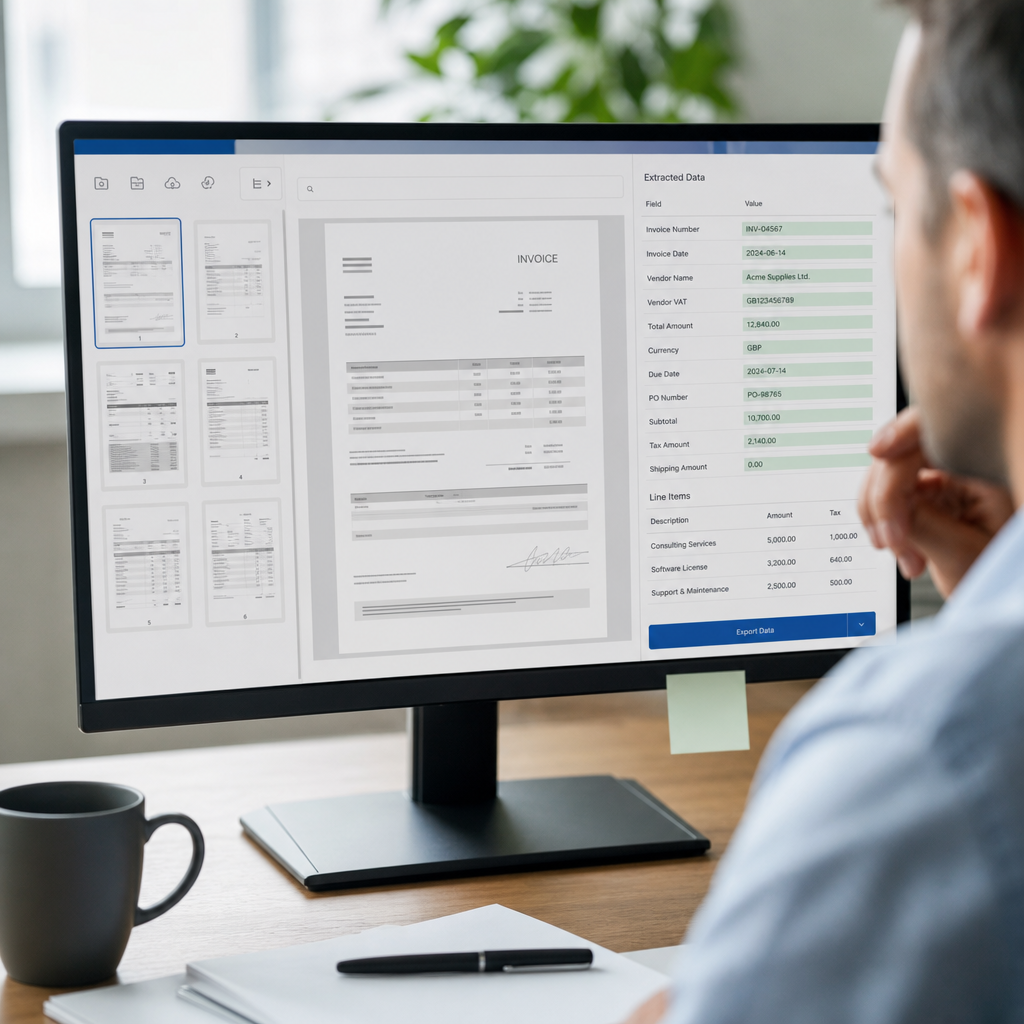
A dedicated PDF parser for accounting firms automates this entire process, extracting transaction dates, descriptions, amounts, and running balances directly into structured, editable formats. This isn't just a time-saver — it's a fundamental shift in how firms allocate their most valuable resource: skilled staff time.
How AI-Powered PDF Parsing Works
Traditional PDF parsing relied on rigid, rule-based templates that mapped specific bank formats to specific extraction rules. The problem was obvious: every time a bank updated its statement layout, the rule-based system broke, requiring manual reconfiguration.
Modern tools like Bank Statement Boss use machine learning models trained on thousands of statement formats from banks and credit unions worldwide. Instead of relying on fixed templates, AI-based parsers recognize patterns — transaction rows, column headers, date formats, currency symbols — regardless of how a particular bank structures its layout.
The general process looks like this:
- Upload — The user uploads a PDF statement (often in bulk).
- Optical recognition — The tool analyzes the document, distinguishing text, scanned images, and tabular structures.
- Data extraction — Transaction-level data is pulled out: date, description, debit/credit amount, and balance.
- Validation — The extracted data is checked against internal logic (e.g., running balances must reconcile) to catch extraction errors.
- Export — Clean data is delivered in spreadsheet or accounting-software-ready formats.
This approach is significantly more resilient than legacy OCR tools. As the National Institute of Standards and Technology has documented in its work on document recognition benchmarks, machine-learning-based extraction consistently outperforms static template matching when documents vary in structure or quality.
Key Features to Look for in a PDF Parser
Not all PDF parsers are built equally, and accounting firms have specific needs that generic document conversion tools often fail to address. When evaluating a solution, firms should prioritize the following capabilities.
Accuracy and Reconciliation Checks
The extracted data is only useful if it's accurate. Look for tools that automatically validate running balances against transaction totals, flagging discrepancies before they reach your books.
Format Compatibility
Your parser should output data in formats that plug directly into the software you already use. This includes:
- CSV and Excel for general spreadsheet work
- QuickBooks-compatible formats (QBO, IIF, or structured CSV)
- Xero-ready CSV templates
- Sage-compatible exports
Bulk Processing
Firms handling multiple clients need the ability to upload and process dozens of statements simultaneously rather than one at a time.
Security and Compliance
Because bank statements contain sensitive financial data, encryption, secure storage, and clear data retention policies are non-negotiable. Firms should review a vendor's practices against frameworks like the SOC 2 standard and verify how long uploaded documents are retained before deletion.
API Access
For firms building custom workflows or integrating statement conversion into existing practice management systems, API access allows direct, automated data pipelines without manual uploads.
Comparing Manual Entry, Generic OCR, and Specialized Parsers
To understand the real value of a purpose-built tool, it helps to compare the three common approaches accounting professionals use to digitize statement data.
| Method | Speed | Accuracy | Scalability | Best For |
|---|---|---|---|---|
| Manual data entry | Very slow (15-30 min/statement) | Prone to human error | Poor | One-off, low-volume needs |
| Generic OCR software | Moderate | Inconsistent with tables | Limited | Simple, single-column documents |
| Specialized PDF parser (e.g., Bank Statement Boss) | Fast (seconds per statement) | High, with reconciliation checks | Excellent | Firms processing multiple clients/statements monthly |
Generic OCR tools, while useful for extracting plain text from scanned documents, typically struggle with the complex, multi-column tabular layouts found in bank statements. They often misread decimal points, merge adjacent columns, or fail entirely on scanned (image-based) PDFs. A parser designed specifically for financial documents accounts for these edge cases from the start.
The Real Cost of Manual Statement Processing
It's worth quantifying what manual processing actually costs a firm, beyond the obvious time drain. Consider a firm with a bookkeeper earning a fully loaded hourly cost of $35.
| Scenario | Statements/Month | Avg. Time per Statement | Monthly Hours | Monthly Labor Cost |
|---|---|---|---|---|
| Small firm (10 clients) | 30 | 20 minutes | 10 hours | $350 |
| Mid-sized firm (50 clients) | 150 | 20 minutes | 50 hours | $1,750 |
| Larger practice (150 clients) | 450 | 20 minutes | 150 hours | $5,250 |
These figures don't account for error correction, which the Association of Certified Fraud Examiners notes often compounds when manual re-entry introduces transposition errors that go undetected until reconciliation — sometimes much later. A single misplaced decimal in a manually entered transaction can cascade into hours of troubleshooting during month-end close.
Automating this process with a PDF parser for accounting firms doesn't just save the hours shown above — it also reduces the downstream cost of correcting errors, a cost that is harder to quantify but often larger in practice.
Integrating a PDF Parser Into Your Accounting Workflow
Adopting new software is only valuable if it fits naturally into existing processes. Here's a practical approach firms can take when rolling out a PDF parsing tool.
Step 1: Audit your current statement intake process. Identify how statements currently arrive (client email, portal upload, physical mail scanned to PDF) and who handles the initial data entry.
Step 2: Choose a tool with the right export formats. Confirm the parser outputs files compatible with your accounting platform — whether that's QuickBooks, Xero, or Sage. Bank Statement Boss, for instance, is built specifically to produce clean exports formatted for these platforms, removing the need for manual reformatting after conversion.
Step 3: Run a pilot with a handful of clients. Before firm-wide rollout, test the tool on a representative sample of statement types — different banks, different account types, scanned vs. digital PDFs — to confirm accuracy.
Step 4: Train staff on the new workflow. Even a highly automated tool requires a defined process: who uploads statements, who reviews flagged discrepancies, and how exported files move into the general ledger.
Step 5: Monitor accuracy and adjust. Track error rates and reconciliation issues over the first few months. Most AI-based parsers improve in reliability as the vendor expands training data, but it's still good practice to spot-check outputs periodically.
Step 6: Scale across the client base. Once the workflow is validated, extend the tool across all applicable clients, and consider API integration if your firm has in-house development resources for deeper automation.

Security Considerations When Choosing a Parser
Because bank statements contain highly sensitive data — account numbers, balances, transaction histories — security can't be an afterthought. Before adopting any PDF parsing tool, firms should ask vendors the following questions:
- Is data encrypted both in transit and at rest?
- Are uploaded files automatically deleted after processing, or retained indefinitely?
- Does the vendor undergo independent security audits or certifications?
- Is there a clear, published privacy policy explaining how data is used?
- Can firms sign a business associate or data processing agreement if required by compliance obligations?
Bank Statement Boss addresses these concerns directly by implementing secure data handling practices designed for financial documents, giving firms confidence that sensitive client data isn't exposed during conversion. Firms handling data for clients in regulated industries should also review guidance from the Federal Trade Commission's Safeguards Rule to ensure any third-party tool aligns with broader data protection obligations.
Common Mistakes Firms Make When Adopting PDF Parsing Tools
Even with the right software, firms can undermine the benefits of automation through poor implementation. Avoid these common pitfalls:
- Skipping the validation step. Automated doesn't mean infallible — always spot-check a percentage of converted statements, especially during the first few months.
- Ignoring scanned/image-based PDFs. Not all parsers handle low-quality scans well. Test with your messiest real-world documents, not just clean digital statements.
- Failing to standardize file naming and storage. Automation only helps if the resulting files are organized logically within your document management system. 4" Not training junior staff on exception handling. When a parser flags a discrepancy, staff need a clear protocol for resolving it rather than reverting to full manual re-entry.
- Choosing a tool based on price alone. A cheaper tool with poor accuracy can cost more in corrective labor than a slightly pricier, more reliable option.
Frequently Asked Questions
Does a PDF parser work with scanned bank statements, not just digital ones? Quality varies by vendor, but AI-based tools like Bank Statement Boss are generally built to handle both native digital PDFs and scanned images, using advanced recognition techniques rather than relying on embedded text layers alone.
Can a PDF parser handle multiple currencies and international bank formats? Many modern parsers support multiple currencies and international date/number formatting conventions, though firms with a global client base should confirm this directly with the vendor before committing.
Is it safe to upload client bank statements to a third-party tool? As long as the vendor uses encryption, secure storage, and clear data retention policies, it is generally considered safe — the same due diligence firms apply to any cloud-based financial software should apply here.
How accurate are AI-powered PDF parsers compared to manual entry? When paired with built-in reconciliation checks (such as balance verification), AI parsers often outperform manual entry, which is subject to fatigue-related transcription errors, especially with high transaction volumes.
Making the Switch
The shift from manual data entry to automated PDF parsing isn't just a convenience upgrade — it's becoming a competitive necessity for accounting firms that want to serve more clients without proportionally increasing headcount. As client expectations around turnaround time continue to rise, firms still relying on manual transcription will find themselves at a structural disadvantage against competitors who've automated the most tedious part of bookkeeping.
The firms seeing the biggest returns aren't necessarily the largest ones — they're the ones that recognized early that a PDF parser for accounting firms isn't a luxury tool, but foundational infrastructure, much like cloud accounting software was a decade ago. Pairing the right parser with clear internal processes, security diligence, and periodic accuracy checks allows a firm to redirect staff hours toward advisory work, tax planning, and client relationships — the services that actually differentiate a practice in a crowded market.
Bank Statement Boss was built specifically to meet this need, converting PDF bank and credit card statements into clean, accounting-software-ready spreadsheets in seconds rather than hours. With formatting compatible with QuickBooks, Xero, and Sage, secure data handling practices, and API access for firms that need deeper integration, Bank Statement Boss gives accounting professionals a faster, more accurate path from raw PDF statements to usable financial data — freeing up time for the work that actually grows a practice.
Article written by FrontRank