
A pdf of bank statement has become the standard format for financial institutions to deliver transaction records to their customers. These digital documents contain comprehensive information about account activity, including deposits, withdrawals, transfers, and balance changes over a specific period. Understanding how to obtain, secure, and effectively use these PDF documents is essential for personal finance management, business accounting, tax preparation, and loan applications. In 2026, the vast majority of financial institutions provide statements exclusively in PDF format, making it crucial to understand their structure, security features, and practical applications.
What Is a PDF of Bank Statement
A pdf of bank statement represents an electronic version of your monthly or quarterly account activity summary. Financial institutions generate these documents to provide account holders with a comprehensive record of all transactions, fees, interest earned, and account balances during a specific period.
Standard Components and Structure
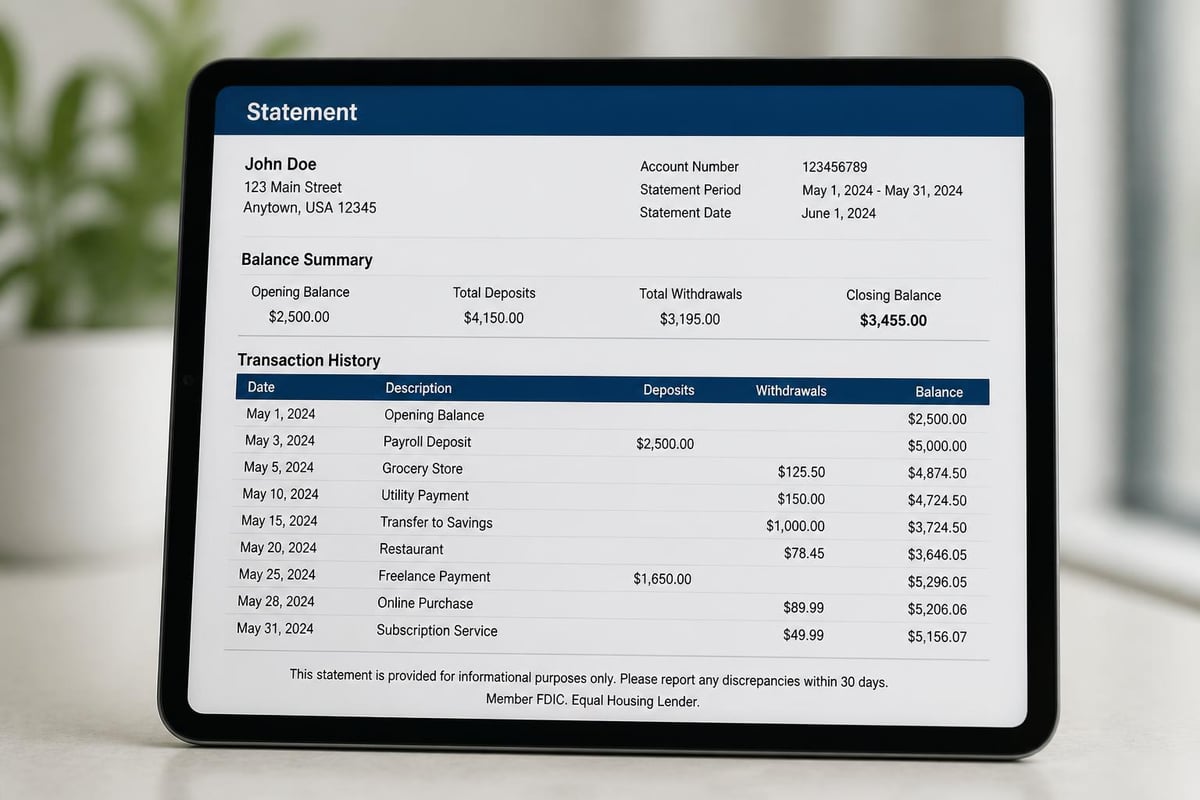
Every pdf of bank statement typically includes several critical sections that provide a complete picture of your account activity. The header section displays account holder information, including name, address, account number, and the statement period dates. The summary section presents opening and closing balances, total deposits, total withdrawals, and any fees charged during the period.
Key elements found in most bank statement PDFs:
- Account identification information
- Statement period (start and end dates)
- Beginning and ending balances
- Detailed transaction list with dates and descriptions
- Fee disclosures and interest calculations
- Contact information for customer service
- Important notices and regulatory disclosures
The transaction section forms the core of any pdf of bank statement, listing every debit and credit in chronological order. Each entry typically includes the transaction date, posting date, description, and amount. Some banks also include running balance information after each transaction.
Text-Based Versus Image-Based PDFs
Understanding the difference between text-based and image-based PDF bank statements is crucial for anyone who needs to extract and analyze transaction data. Text-based PDFs contain actual text layers that allow for easy copying, searching, and data extraction. These documents are generated directly from banking systems and maintain the digital structure of the underlying data.
Image-based PDFs, conversely, are essentially pictures of documents. These might be scanned paper statements or PDFs generated through certain printing processes. While they look identical to text-based versions, they lack the embedded text layer, making data extraction significantly more challenging without optical character recognition (OCR) technology.
| PDF Type | Data Extraction | File Size | Searchability | Editing Capability |
|---|---|---|---|---|
| Text-based | Easy | Smaller | Full text search | Can copy/paste text |
| Image-based | Difficult | Larger | None without OCR | Cannot select text |
| Mixed | Moderate | Variable | Partial | Limited to text layers |
How to Obtain a PDF of Bank Statement
Modern banking provides multiple convenient methods for accessing your statement documents. Understanding the various methods to obtain bank statements helps you choose the most efficient approach for your specific needs.
Online Banking Portals
The most common method for accessing a pdf of bank statement in 2026 is through your bank's online portal. Most financial institutions maintain digital archives of statements going back seven years or more, making historical records readily accessible.
Steps to download statements online:
- Log into your online banking account using secure credentials
- Navigate to the statements or documents section
- Select the account for which you need statements
- Choose the statement period from available options
- Click download to save the PDF to your device
- Verify the download completed successfully
Getting bank statements online has become the preferred method for most consumers due to instant access and environmental benefits. Banks typically organize statements by month and year, allowing you to download multiple periods simultaneously if needed.
Mobile Banking Applications
Mobile apps have revolutionized how customers access financial documents. Most banking apps now feature dedicated sections for viewing and downloading PDF statements directly to your smartphone or tablet. This convenience allows you to access important financial documents anywhere, anytime.
The mobile download process mirrors the online portal experience but optimizes the interface for smaller screens. Many apps also offer the ability to share statements directly through email or cloud storage services, streamlining workflows for users who need to submit documents to accountants, lenders, or other parties.
Branch and Mail Options
Despite the digital shift, traditional methods remain available. You can request a pdf of bank statement by visiting a branch location, where representatives can print or email documents directly. Some institutions charge fees for this service, particularly for older statements or multiple copies.
Mail delivery of physical statements continues for customers who prefer paper records, though many banks now charge monthly fees for this service. These mailed statements can be scanned to create your own PDF versions, though the quality and usability may vary depending on scanning equipment and techniques.

Understanding Different Bank Statement Formats
While PDF remains the dominant format, banks provide statements in various formats designed for different purposes. Each format serves specific use cases and offers unique advantages depending on your needs.
PDF Format Characteristics
The pdf of bank statement format excels at preserving the visual appearance and official nature of financial documents. PDFs maintain consistent formatting across all devices and operating systems, ensuring that statements look identical whether viewed on a computer, tablet, or smartphone. This consistency makes PDF the preferred format for official documentation, loan applications, and regulatory compliance.
However, PDF's strengths in presentation create challenges for data analysis. The format prioritizes visual layout over data structure, making it difficult to import transaction information directly into spreadsheets or accounting software without conversion.
CSV and Spreadsheet Formats
Comma-separated value (CSV) files represent transaction data in a structured, machine-readable format. Unlike PDFs, CSV files organize data in rows and columns without formatting or visual styling. This structure makes CSV ideal for importing into accounting software, performing analysis in spreadsheet applications, and automating financial workflows.
Many banks offer CSV downloads alongside PDF statements, recognizing that customers need both presentation-quality documents and analyzable data. Converting between bank statement formats has become essential for businesses and individuals who need to work with transaction data efficiently.
Specialized Financial Formats
OFX (Open Financial Exchange) and QBO (QuickBooks) formats serve specific purposes in financial management ecosystems. OFX provides a standardized way to exchange financial data between institutions and software applications, supporting complex transaction details including investment information and account classifications.
QBO files are specifically designed for QuickBooks users, streamlining the import process for this popular accounting platform. These formats eliminate manual data entry and reduce errors when transferring information from bank statements to accounting systems.
| Format | Best For | Data Structure | Software Compatibility | Human Readability |
|---|---|---|---|---|
| Official records, sharing | Presentation-focused | Universal viewing | High | |
| CSV | Data analysis, imports | Row/column structure | Spreadsheets, databases | Moderate |
| OFX | Multi-platform compatibility | Standardized financial | Broad accounting software | Low |
| QBO | QuickBooks users | QuickBooks-optimized | QuickBooks ecosystem | Low |
Security and Privacy Considerations
A pdf of bank statement contains highly sensitive personal and financial information, making security paramount when handling these documents. Understanding security features and best practices protects you from identity theft, fraud, and unauthorized access.
Built-In PDF Security Features
Modern bank-generated PDFs incorporate multiple security layers. Password protection prevents unauthorized access, requiring recipients to enter a secure password before viewing document contents. Banks typically use account numbers, social security number portions, or custom PINs as password protection.
Encryption technology scrambles document contents during transmission and storage, ensuring that intercepted files remain unreadable without proper decryption keys. Most financial institutions use bank-level 256-bit encryption standards, the same technology protecting online banking sessions.
Common security features in bank statement PDFs:
- Password protection requiring authentication
- 256-bit AES encryption for data protection
- Digital signatures verifying document authenticity
- Watermarks indicating official bank issuance
- Download tracking and audit trails
- Expiration dates for temporary access links
Safe Storage and Transmission
Storing PDF bank statements requires careful attention to security. Local storage should utilize encrypted folders or password-protected drives. Cloud storage services offer convenience but require selection of providers with strong security credentials and compliance certifications.
When emailing a pdf of bank statement, always use encrypted email services or secure file-sharing platforms. Standard email transmits documents in plain text, making them vulnerable to interception. Many banks provide secure message centers within online banking portals specifically for sharing sensitive documents.
You can learn more about security measures for handling financial documents to ensure your information remains protected throughout the document lifecycle. Organizations handling customer bank statements must implement comprehensive security protocols meeting or exceeding industry standards.
Converting PDF Bank Statements to Usable Data
The challenge of extracting transaction data from a pdf of bank statement has led to significant technological advancement in document processing. Converting PDF statements into structured data formats enables efficient accounting, analysis, and financial management.
Manual Conversion Challenges
Manually retyping transaction information from PDF statements into spreadsheets or accounting software represents a time-consuming, error-prone process. A single month's statement might contain dozens or hundreds of transactions, each requiring accurate entry of dates, descriptions, and amounts.
The visual layout of PDF documents complicates data extraction. Information spreads across columns with varying spacing, descriptions may wrap across multiple lines, and formatting inconsistencies require constant attention. Even small transcription errors can create accounting discrepancies that take hours to identify and correct.
Automated Conversion Solutions
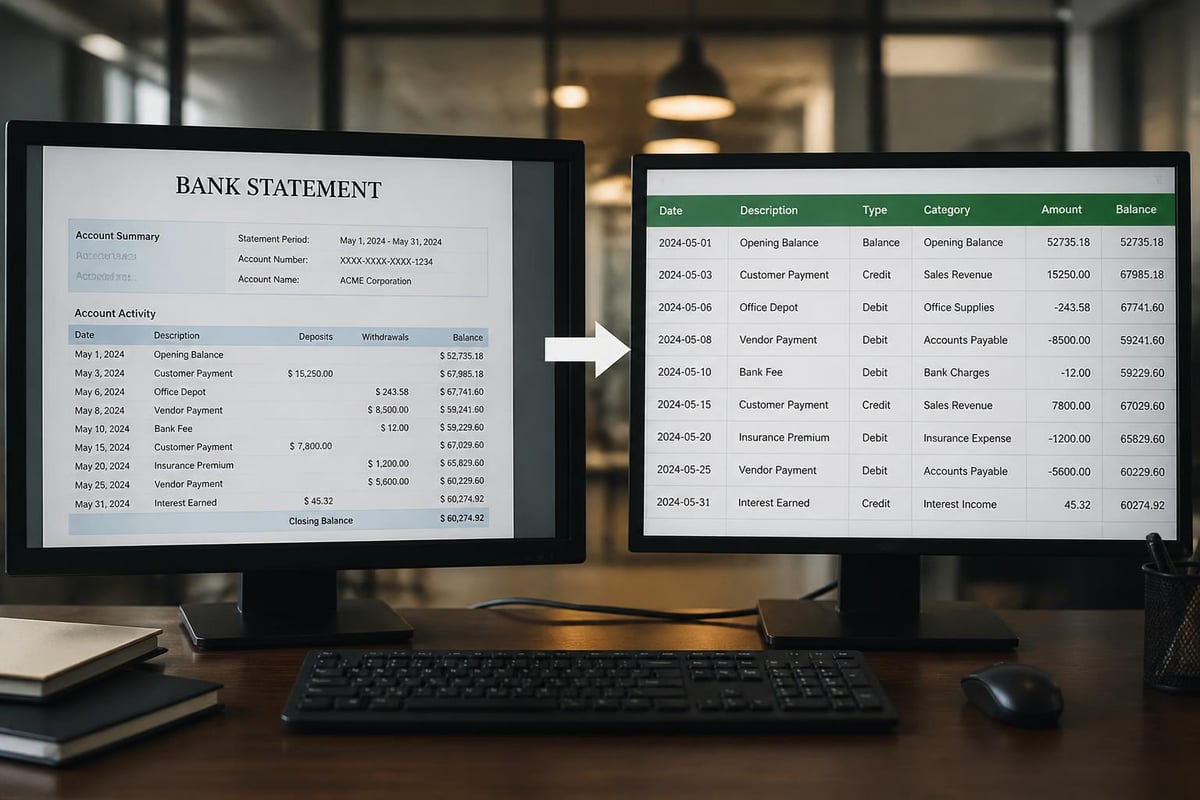
Modern conversion technology addresses these challenges through artificial intelligence and machine learning. Services can convert PDF bank statements to usable spreadsheets with remarkable accuracy, transforming static documents into structured data ready for import into accounting platforms.
Advanced conversion systems recognize complex table structures within PDF documents, identifying column headers, transaction rows, and totals sections. These systems handle various bank formats, adapting to different layouts while maintaining consistent output structure.
Integration with Accounting Systems
Converting a pdf of bank statement into formats compatible with QuickBooks, Xero, or other accounting platforms streamlines financial workflows significantly. Rather than spending hours on data entry, businesses can import properly formatted transaction data with a few clicks.
The conversion process maintains critical transaction details including dates, payees, amounts, and reference numbers. Many conversion services also support categorization features, automatically classifying transactions by type to accelerate bookkeeping processes. For detailed guidance on formatting bank statements for various purposes, consider how different accounting systems handle imported data.
Common Uses for PDF Bank Statements
A pdf of bank statement serves numerous purposes beyond simple account monitoring. Understanding these applications helps you maintain proper documentation and leverage statements effectively for various financial needs.
Personal Finance Management
Individuals use PDF bank statements to track spending patterns, identify subscription services, and monitor account activity for unauthorized transactions. Regular review of statements helps detect fraudulent charges quickly, enabling faster resolution and minimizing financial impact.
Budget planning relies heavily on accurate transaction history. Analyzing spending patterns across multiple months reveals opportunities for cost reduction and helps establish realistic budget targets. Many personal finance applications can import data from PDF statements to automate this analysis.
Business Accounting and Reconciliation
For businesses, a pdf of bank statement forms the foundation of accurate bookkeeping. Monthly reconciliation processes compare statement transactions against accounting records, identifying discrepancies that require investigation and resolution. This verification ensures financial reports accurately reflect actual cash positions.
Year-end accounting procedures depend on complete statement archives. Accountants reference these documents when preparing tax returns, audit responses, and financial statements. Maintaining organized PDF statement archives simplifies these processes and ensures compliance with record-keeping requirements. Resources about common banking questions can help businesses understand statement-related requirements.
Loan Applications and Verification
Lenders require PDF bank statements to verify income, assess spending patterns, and evaluate financial stability. Mortgage applications typically request three to six months of statements for all accounts. The official PDF format provides authentication that spreadsheets or screenshots cannot match.
Employment verification increasingly relies on bank statement analysis rather than traditional pay stubs, particularly for self-employed individuals and gig economy workers. Consistent deposit patterns demonstrate income stability even without formal employment documentation.
Tax Preparation and Audit Support
Tax professionals reference PDF bank statements when preparing returns, particularly for deductible expenses and income verification. Statements provide the documentation trail needed to substantiate deductions if questioned by tax authorities. Research on bank statement features demonstrates how detailed transaction data supports financial assessments and credit scoring.
During audits, organized statement archives enable quick retrieval of supporting documentation. The ability to produce requested statements promptly demonstrates good record-keeping and can expedite audit resolution.
Best Practices for Managing PDF Bank Statements
Effective management of PDF bank statements ensures documents remain accessible, secure, and useful throughout their retention period. Implementing systematic organization and storage practices saves time and reduces stress when documents are needed.
Organization Systems
Creating a logical filing system is essential for managing multiple accounts and years of statements. Many users organize PDFs by institution, then account type, then year and month. This hierarchy allows quick navigation to specific statements when needed.
Recommended folder structure:
- Financial Documents (root folder)
- Bank Name (institution folders)
- Account Type (checking, savings, credit card)
- Year (2026, 2025, etc.)
- Individual monthly PDFs with consistent naming
Consistent file naming conventions prevent confusion and enable easy sorting. Consider formats like "2026-05-Chase-Checking-Statement.pdf" that include date, institution, and account type in a standardized order.
Digital Archive Solutions
Cloud storage services offer convenient access to PDF statements from any device while providing automatic backup protection. Services like Google Drive, Dropbox, and OneDrive support PDF storage with search functionality and sharing capabilities.
Local backup systems provide additional security layers. External hard drives or network-attached storage devices should maintain encrypted copies of financial documents. Following the 3-2-1 backup rule (three copies, two different media types, one offsite) ensures document preservation even in disaster scenarios.
Retention Guidelines
Financial experts generally recommend retaining PDF bank statements for seven years, aligning with IRS audit windows and business record-keeping requirements. Some situations warrant longer retention, particularly for documents supporting tax deductions, major purchases, or ongoing legal matters.
Regular archive reviews identify documents eligible for secure deletion, reducing storage requirements and potential exposure in data breaches. When deleting PDF bank statements, use secure deletion methods that overwrite data rather than simple file deletion.
Troubleshooting Common PDF Statement Issues
Working with a pdf of bank statement occasionally presents technical challenges. Understanding common issues and their solutions prevents frustration and ensures access to important financial documents.
Password and Access Problems
Forgotten passwords represent the most common access barrier. Banks typically use predictable password patterns based on account information. Try combinations of your account number, last four digits of social security number, or birth date if you cannot remember the specific password.
If standard password attempts fail, contact your bank's customer service department. Representatives can verify your identity and provide password reset instructions or reissue the statement with a new password.
Corruption and Display Issues
Corrupted PDF files may fail to open or display incorrectly. This typically occurs during download interruptions or file transfer problems. Re-downloading the statement from your bank's portal usually resolves corruption issues.
Display problems might stem from outdated PDF reader software. Adobe Acrobat Reader remains the gold standard for PDF viewing, supporting the full range of PDF features and security implementations. Free alternative readers sometimes struggle with encrypted or complex PDF documents.
Format Compatibility Challenges
Some accounting software and data analysis tools struggle with the complex layouts found in PDF bank statements. Research on table detection from bank statements demonstrates how advanced techniques improve extraction accuracy from challenging document formats.
When direct PDF imports fail, conversion to intermediate formats like CSV or Excel provides compatibility. Specialized conversion tools handle the complex table structures and formatting variations found across different financial institutions.
Mobile Device Limitations
Viewing PDF bank statements on smartphones presents screen size challenges. Many banking apps optimize PDF display for mobile viewing, but complex multi-column layouts may require horizontal scrolling or zooming.
Downloading statements to mobile devices for offline access requires sufficient storage space. PDF files typically range from 100KB to several megabytes depending on page count and embedded graphics. Regular storage maintenance ensures space availability for new downloads.
Future of Bank Statement Delivery
The pdf of bank statement format continues evolving as technology advances and customer expectations change. Understanding emerging trends helps prepare for future document management requirements.
Real-Time Statement Access
Traditional monthly statement cycles are giving way to on-demand access. Many banks now offer real-time statement generation, allowing customers to create PDF documents for any date range at any time. This flexibility supports immediate verification needs without waiting for monthly statement publication.
API-based access enables automated statement retrieval for businesses managing multiple accounts. Rather than manually downloading PDFs, systems can automatically fetch statements on scheduled intervals, ensuring continuous access to current financial data.
Enhanced Data Integration
Future PDF bank statements may include embedded structured data layers alongside traditional visual formatting. This hybrid approach maintains official document appearance while enabling direct data extraction without conversion. PDF archiving standards continue evolving to support long-term document preservation and accessibility.
Machine-readable transaction codes and standardized categorization will reduce the manual effort required for expense classification and bookkeeping. As artificial intelligence capabilities expand, bank systems will provide increasingly sophisticated analysis within statement documents themselves.
Security Advancements
Blockchain technology may soon authenticate bank statements, providing tamper-proof verification of document authenticity. Digital signatures using blockchain create permanent records of document generation, making statement forgery effectively impossible. Understanding PDF security risks helps financial institutions implement comprehensive protection strategies.
Biometric authentication may replace traditional passwords for accessing PDF bank statements, using fingerprint or facial recognition to ensure only authorized users can view sensitive financial information. These technologies balance convenience with enhanced security.
Managing PDF bank statements effectively requires understanding their structure, security features, and practical applications across personal and business finance. From obtaining statements through multiple channels to organizing digital archives and extracting usable data, each aspect plays a crucial role in financial management. For those needing to transform static PDF documents into actionable spreadsheet data, Bank Statement Boss offers AI-powered conversion with 99% accuracy, compatible with major accounting platforms while maintaining bank-level security throughout the process.