

Every business that pays vendors eventually hits the same wall: invoices pile up, approvals stall in email threads, and someone on the finance team spends hours re-keying numbers into a ledger. Accounts payable automation software exists to solve exactly this problem, but choosing the right system requires understanding what these tools actually do, how they differ, and where they fit into your broader financial workflow. This guide walks through the practical steps of selecting, implementing, and getting the most out of accounts payable automation software in 2026.
What Accounts Payable Automation Software Actually Does
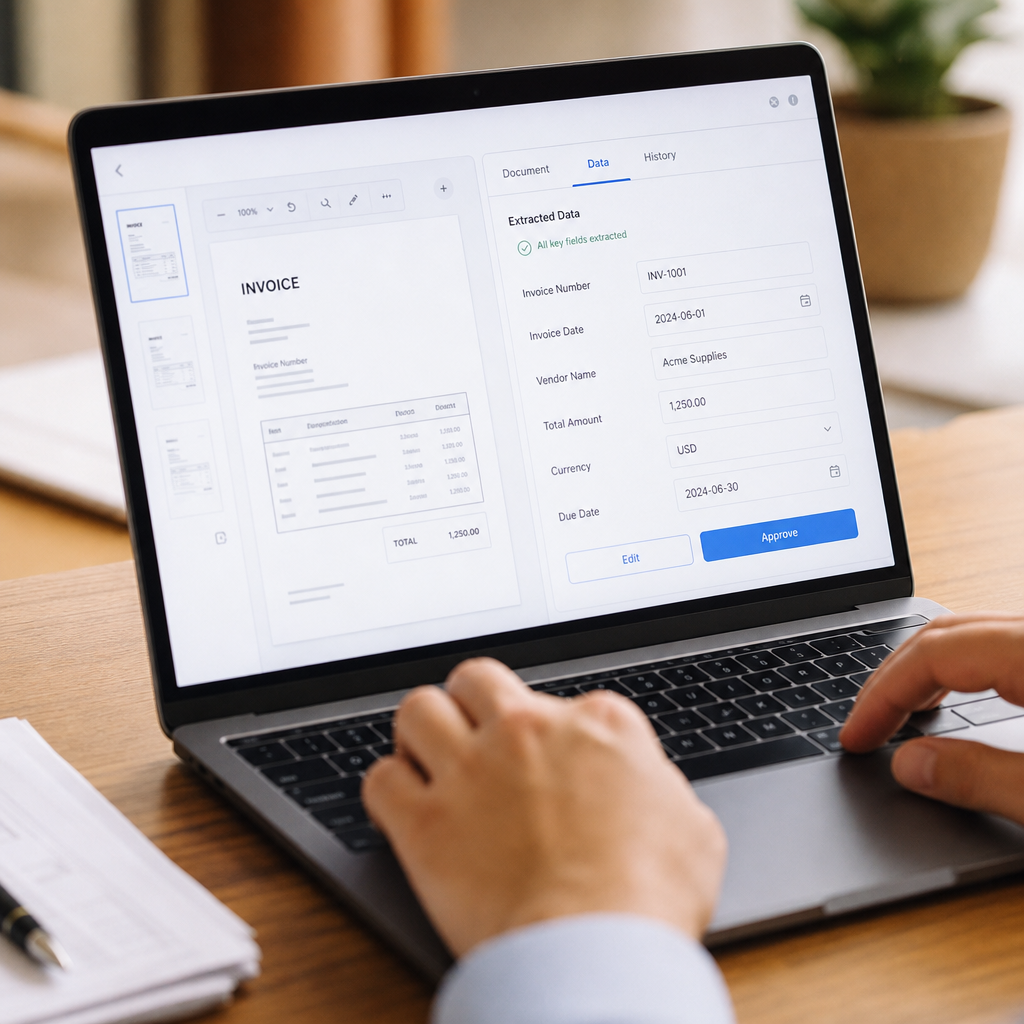
At its core, accounts payable (AP) automation software replaces manual invoice processing with digital workflows. Instead of a bookkeeper opening emails, downloading PDF invoices, and typing line items into a spreadsheet, the software captures invoice data automatically, routes it for approval, and syncs the final records with your accounting platform.
Most modern AP automation tools combine several capabilities:
- Optical character recognition (OCR) and AI data extraction to pull vendor names, amounts, due dates, and line items from invoices
- Approval workflow routing so invoices move automatically to the right manager based on amount or department
- Duplicate detection to catch invoices that have already been paid
- Payment scheduling and execution, sometimes including ACH or virtual card payments
- Accounting software sync with platforms like QuickBooks, Xero, Sage, or NetSuite
The best systems reduce processing time from days to minutes while improving accuracy and giving finance teams better visibility into cash flow. According to research from McKinsey, finance functions that automate routine processes like AP can cut processing costs by more than 50% while also reducing error rates significantly.
Why Manual AP Processes Are Costing You More Than You Think
Many small businesses and bookkeeping firms still rely on manual AP processes, often because switching systems feels disruptive. But the hidden costs add up quickly:
- Labor costs — Manual invoice entry can take 10-15 minutes per invoice when you include matching, approval chasing, and filing.
- Late payment penalties — Delayed approvals mean missed early-payment discounts and occasional late fees.
- Fraud exposure — Manual processes are more vulnerable to duplicate payments and invoice fraud, a risk highlighted repeatedly by the Association of Certified Fraud Examiners.
- Lost visibility — Without a centralized system, it's hard to know what's owed, to whom, and when.
- Scaling bottlenecks — As transaction volume grows, manual processes simply can't keep pace without adding headcount.
A 2026 benchmark report from the Institute of Finance and Management found that best-in-class AP departments process invoices for a fraction of the cost of bottom-quartile performers, almost entirely due to automation adoption. For growing businesses, the math on automation tends to work out quickly — often within the first six to twelve months.
Key Features to Look For in Accounts Payable Automation Software
Not all AP automation platforms are built the same. When evaluating vendors, prioritize the following capabilities:
Data Capture Accuracy
The software's ability to correctly read invoice data — vendor names, totals, tax amounts, line items — determines how much manual review you'll still need to do. Look for vendors who publish accuracy benchmarks (ideally 95%+ on structured data) and who support a wide range of invoice formats, including scanned paper and PDFs.
Approval Workflow Flexibility
Your approval chains probably aren't one-size-fits-all. Good AP software lets you set custom rules based on dollar thresholds, department, vendor type, or project code, and should support mobile approvals for managers who are frequently out of office.
Integration Depth
AP automation is only as useful as its ability to sync cleanly with your general ledger. Confirm two-way sync with your accounting platform, not just one-way data export.
Payment Execution Options
Some tools only prepare payment batches; others can execute ACH transfers, issue virtual cards, or cut checks directly. Decide whether you want payment execution inside the same tool or prefer to keep that function separate for internal controls.
Audit Trail and Compliance
Every action — upload, approval, edit, payment — should be logged with a timestamp and user ID. This matters both for internal controls and for external audits.
Vendor Management
Look for built-in vendor portals, W-9 collection, and 1099 tracking if you work with contractors.
Comparing Accounts Payable Automation Approaches
There's no single "best" AP automation setup — the right choice depends on your transaction volume, team size, and existing software stack. Here's how the main approaches compare:
| Approach | Best For | Typical Cost | Setup Time |
|---|---|---|---|
| Full AP automation suite (e.g., Bill.com, Tipalti) | Mid-size companies with high invoice volume | $$$ (per-user + transaction fees) | 2-6 weeks |
| Accounting platform add-ons (QuickBooks Bill Pay, Xero Bills) | Small businesses already using that ecosystem | $$ (bundled or low monthly fee) | Days |
| Document conversion + manual workflow | Freelance accountants, small bookkeeping firms | $ (per-document or subscription) | Immediate |
| Custom-built / ERP-integrated automation | Enterprises with complex approval hierarchies | \(\) (implementation + licensing) | 2-6 months |
For many small businesses and independent bookkeepers, a lighter-weight approach — pairing a reliable document conversion tool with your existing accounting software — delivers most of the benefit without the overhead of a full enterprise AP suite. This is where a tool like Bank Statement Boss fits naturally into the stack: it doesn't replace a full AP platform, but it solves one of the most tedious parts of the AP and reconciliation process — turning PDF bank and credit card statements into clean, structured spreadsheets that are ready for QuickBooks, Xero, or Sage.
How Document Conversion Fits Into the AP Automation Workflow
Accounts payable isn't just about invoices — it's also about reconciling what actually left the bank account against what was recorded. This is where many AP workflows break down, especially for smaller teams that don't have a dedicated AP automation suite.
Consider a typical freelance bookkeeper managing AP for five small business clients. Even with invoice automation in place, they still need to:
- Download monthly bank and credit card statements from each client
- Match recorded payments against actual bank transactions
- Identify discrepancies, duplicate payments, or missed invoices
- Reconcile everything before closing the books
Manually transcribing PDF bank statements for this step is one of the most time-consuming parts of the process — and it's exactly the gap that Bank Statement Boss is built to close. By converting PDF statements into structured spreadsheets formatted for direct import into accounting platforms, it removes the manual re-keying step that otherwise undermines the efficiency gains from invoice automation. Teams using AI-based document conversion alongside their AP software report significantly faster month-end closes, since reconciliation no longer requires manual transcription.
For firms managing multiple clients or high transaction volumes, combining a dedicated AP automation tool with a reliable statement conversion tool creates a more complete automated workflow — covering both the payment initiation side and the reconciliation side of accounts payable.
Step-by-Step: Implementing AP Automation Software
Rolling out new AP software works best with a structured plan rather than a sudden switch. Here's a practical implementation sequence:
- Audit your current process. Document every step from invoice receipt to payment, including who approves what and at what dollar thresholds.
- Define requirements. List must-have integrations (accounting platform, bank, payroll system) and nice-to-have features (mobile approvals, vendor portal).
- Shortlist 3-4 vendors. Request demos focused on your actual invoice types, not generic sales presentations.
- Run a pilot. Process a month of real invoices in parallel with your existing system before fully switching over.
- Migrate vendor data. Clean up duplicate or outdated vendor records before importing them into the new system.
- Train your team. Even intuitive software needs a short onboarding session to establish new habits around approvals and exception handling.
- Set up reconciliation checkpoints. Decide how bank statement data will be converted and matched against AP records — this is where a tool for digitizing statements becomes essential.
- Review after 60 days. Check error rates, processing time, and user adoption, then adjust workflow rules as needed.
Following a phased rollout like this reduces the risk of disruption and gives your team time to adjust without jeopardizing vendor relationships or payment timelines.
Comparing Popular AP Automation Platforms
To give a clearer sense of the market, here's a comparison of commonly used AP automation tools and how they handle core functions as of 2026:
| Platform | Core Strength | Accounting Integrations | Payment Execution |
|---|---|---|---|
| Bill.com | Broad small-business adoption, vendor network | QuickBooks, Xero, Sage, NetSuite | Yes (ACH, check, card) |
| Tipalti | Global payouts, tax compliance | NetSuite, QuickBooks, Xero | Yes (multi-currency) |
| Airbase | Spend management + AP combined | QuickBooks, NetSuite, Sage Intacct | Yes |
| QuickBooks Bill Pay | Native integration for QuickBooks users | QuickBooks only | Yes |
| Bank Statement Boss | PDF statement-to-spreadsheet conversion for reconciliation | QuickBooks, Xero, Sage-formatted exports | No (data prep only) |
This comparison highlights an important point: most AP automation platforms focus on the invoice-to-payment side of the process, while tools like Bank Statement Boss specialize in the reconciliation and data-preparation side. Using both together, rather than expecting a single platform to do everything, often produces a more reliable and cost-effective workflow — particularly for small firms that don't need (or want to pay for) a full enterprise suite.
Security and Compliance Considerations
Financial automation tools handle sensitive data, so security practices matter as much as features. When evaluating any AP automation or document conversion software, confirm:
- Encryption in transit and at rest for all uploaded documents and data
- SOC 2 compliance or equivalent independent security audits
- Data retention policies that let you control how long documents are stored
- Role-based access controls so only authorized users can view sensitive financial data
- API security if you're connecting multiple tools, including authentication standards like OAuth
The National Institute of Standards and Technology publishes widely referenced guidelines on data security practices that many SaaS vendors align with — it's worth checking whether your shortlisted vendors reference these standards in their security documentation. Bank Statement Boss, for example, emphasizes secure data handling as part of its core service, which matters given that bank statements contain some of the most sensitive financial data a business handles.

Measuring ROI From AP Automation
Before and after adopting AP automation software, it's worth tracking a few concrete metrics to confirm you're getting real value:
- Cost per invoice processed (labor + software costs divided by invoice volume)
- Average approval cycle time (days from receipt to approval)
- Early payment discount capture rate
- Error and duplicate payment rate
- Month-end close duration
Many finance teams find that the reconciliation step — matching bank statement data against AP records — remains a bottleneck even after invoice automation is in place. Addressing that gap with a dedicated conversion tool often produces a disproportionately large time savings relative to its cost, since it directly shortens the month-end close.
For businesses looking to build out a broader automated finance stack, it's also worth exploring complementary tools in adjacent areas like lead generation and client communications — platforms such as leadmailbox.com are commonly used by accounting and bookkeeping firms to manage client intake and communication alongside their financial automation tools, creating a more connected back-office system.
Common Mistakes When Adopting AP Automation Software
Even well-chosen software can underperform if the rollout isn't handled carefully. Watch out for these common pitfalls:
- Automating a broken process. If your approval chain is inefficient on paper, automation will just make the inefficiency faster, not fix it.
- Skipping vendor data cleanup. Importing duplicate or outdated vendor records creates confusion down the line.
- Ignoring exception handling. Make sure your team knows what to do when an invoice doesn't match a purchase order or when OCR extraction fails.
- Underestimating training time. Even intuitive tools need a short adjustment period; rushing this step often causes early resistance to adoption.
- Treating reconciliation as an afterthought. Invoice automation alone doesn't close the loop — bank statement reconciliation still needs a reliable process, which is why many teams pair their AP system with a dedicated conversion tool.
Final Thoughts
Accounts payable automation software has moved from a nice-to-have to a practical necessity for businesses that want to control costs, reduce errors, and free up finance staff for higher-value work. The right choice depends on your transaction volume, existing software stack, and how much of the payment-execution process you want handled inside the same platform. For many small businesses, freelance accountants, and bookkeeping firms, the most practical path isn't a single do-everything suite — it's pairing a focused AP tool with reliable supporting software for the reconciliation side of the process. That's where Bank Statement Boss plays its role: by converting PDF bank and credit card statements into clean, QuickBooks-, Xero-, and Sage-ready spreadsheets, bankstatementboss.com removes one of the most tedious manual steps left in modern accounts payable workflows, helping finance teams close their books faster and with greater confidence in the numbers.
Article written by FrontRank