
Managing financial records in PDF format has become the standard across businesses of all sizes. Every month, millions of bank statements, invoices, and financial reports arrive as PDF documents, creating both opportunities and challenges for accounting professionals. The accounting pdf workflow determines how efficiently businesses can analyze their finances, prepare tax documents, and maintain compliance with regulatory requirements. Understanding how to handle these documents effectively can save countless hours while reducing errors that cost businesses thousands of dollars annually.
The Evolution of Accounting Documentation
The transition from paper ledgers to digital formats revolutionized how businesses maintain financial records. Today's accounting landscape relies heavily on PDF documents because they preserve formatting across different platforms and devices. Financial institutions, vendors, and tax authorities consistently deliver statements and invoices in PDF format, making it the de facto standard for business communications.
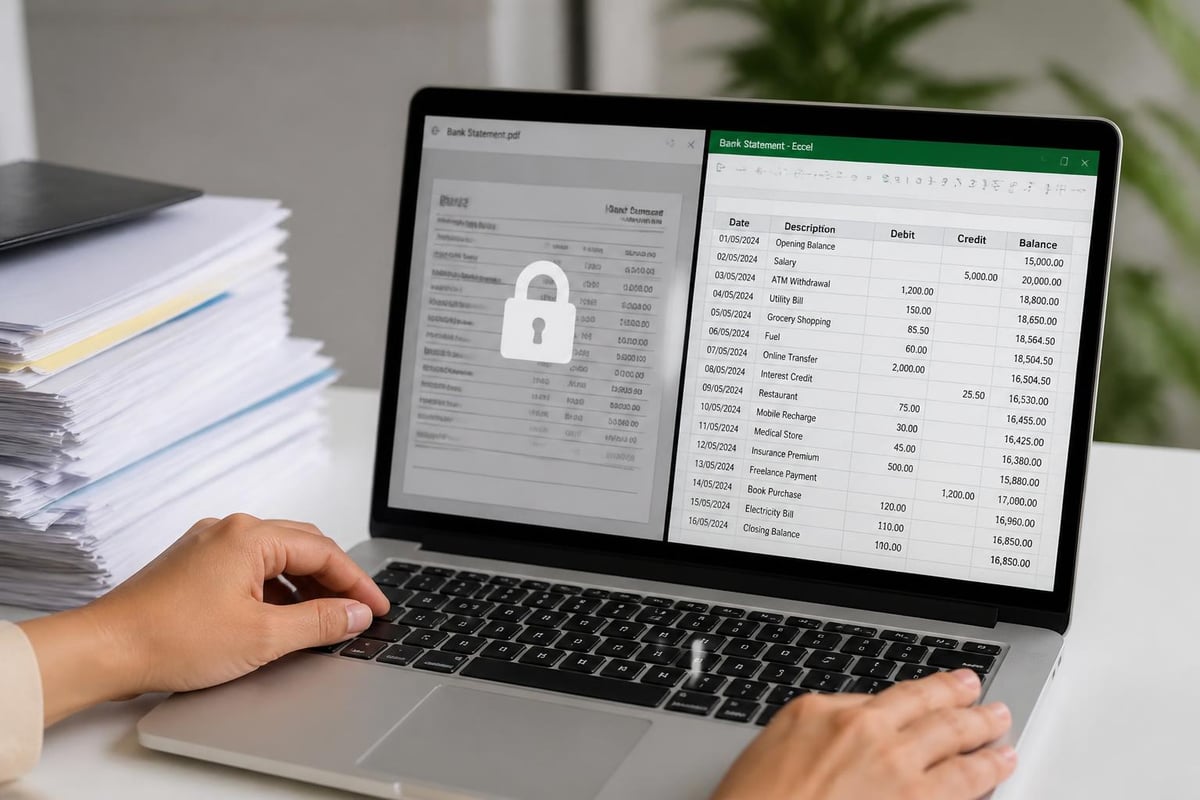
This standardization creates a paradox for accounting teams. While PDFs ensure document integrity and security, they simultaneously lock data into a format that resists easy manipulation. Accounting pdf files contain valuable transaction data, but extracting that information for analysis requires specialized approaches.
Why PDFs Dominate Financial Documentation
Several factors explain the widespread adoption of PDF for accounting purposes:
- Universal compatibility across operating systems and devices
- Security features including password protection and encryption
- Preservation of formatting regardless of viewing software
- Legal acceptance as valid documentation for audits and compliance
- Compression capabilities that reduce file sizes for storage
The challenge emerges when accountants need to work with the data inside these documents. Traditional accounting principles emphasize accuracy and efficiency, yet manually entering data from PDF statements contradicts both principles.
Manual Data Entry Challenges
Copying transaction data from PDF bank statements into accounting software represents a significant productivity drain. A typical monthly statement might contain 50-100 transactions, each requiring manual entry of dates, descriptions, amounts, and categories.
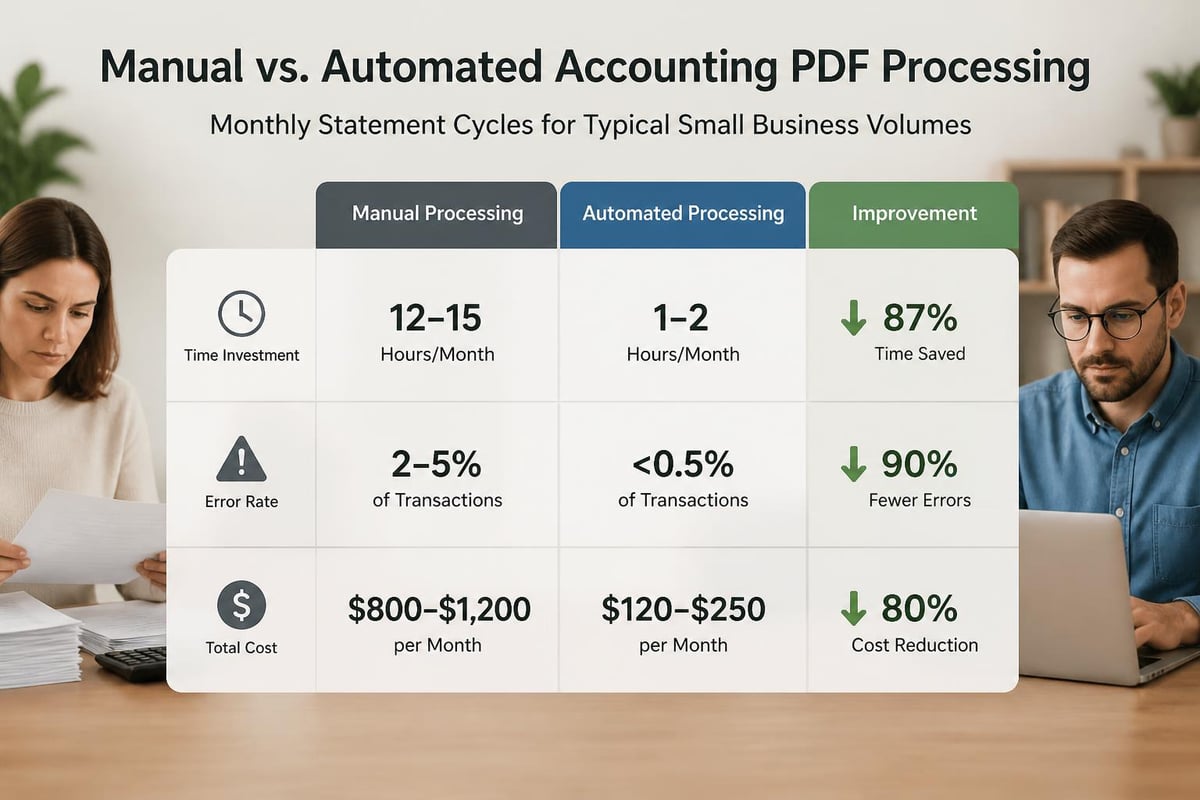
The error rate for manual data entry ranges from 1% to 4% depending on complexity and volume. For a business processing 1,000 monthly transactions, this translates to 10-40 errors that could affect financial reporting, tax calculations, or budget forecasting. These mistakes often remain undetected until they cascade into larger problems during audits or reconciliation processes.
Time Investment Analysis
| Task | Time per Transaction | Monthly Cost (100 transactions) |
|---|---|---|
| Manual entry | 2-3 minutes | 3.3-5 hours |
| Error checking | 30-60 seconds | 0.8-1.7 hours |
| Corrections | 1-2 minutes (average) | 0.5-1 hours |
| Total | ~3-4 minutes | 4.6-7.7 hours |
Professional bookkeepers charging $50-75 per hour spend $230-$580 monthly just processing statements. Scaling this across multiple accounts and statements reveals why businesses seek automation solutions.
Converting Accounting PDF Files to Usable Formats
Modern technology offers several pathways for transforming accounting pdf documents into editable spreadsheets. Each approach carries distinct advantages and limitations that affect accuracy, speed, and cost.
OCR Technology Applications
Optical Character Recognition (OCR) software scans PDF documents and converts printed or digital text into machine-readable characters. Early OCR systems struggled with complex layouts and numerical precision, but contemporary solutions achieve significantly higher accuracy rates.
Advanced OCR platforms designed specifically for financial documents recognize table structures, understand accounting conventions, and maintain relationships between related data fields. This specialization proves critical when processing bank statements where column alignment and decimal placement directly impact accuracy.
AI-Powered Conversion Methods
Artificial intelligence revolutionizes how businesses handle financial document conversion. Machine learning models trained on millions of bank statements recognize patterns that traditional OCR misses. These systems understand context, differentiate between credits and debits, and intelligently categorize transactions based on description patterns.
Converting PDF bank statements to usable spreadsheets eliminates manual entry while achieving accuracy rates exceeding 99%. The technology handles various statement formats from different financial institutions, adapting to layout variations that confuse simpler conversion tools.
The integration capabilities with accounting platforms like QuickBooks, Xero, and FreshBooks streamline workflows further. Rather than converting and then manually importing data, modern solutions create files formatted specifically for direct import into these systems.

Best Practices for Managing Financial PDFs
Establishing systematic approaches to accounting pdf management prevents data loss, maintains audit trails, and ensures regulatory compliance. Professional accounting standards require documentation retention spanning 3-7 years depending on jurisdiction and document type.
File Naming Conventions
Implement consistent naming structures that enable quick retrieval:
- Institution identifier (e.g., Chase, WellsFargo)
- Account type (Checking, Savings, CreditCard)
- Account last four digits
- Statement period (YYYY-MM format)
- Version or revision number if applicable
Example: Chase_Checking_4567_2026-05.pdf
This structure supports alphabetical sorting while providing immediate context about each document's contents. When dealing with multiple month statements, this organization becomes essential for tracking quarterly reviews or loan applications.
Security Considerations
Financial PDFs contain sensitive information requiring protection beyond standard document security. Password protection provides a first layer of defense, but comprehensive security encompasses:
- Encrypted storage both locally and in cloud systems
- Access logging to track who views or modifies documents
- Secure transmission using encrypted channels for sharing
- Regular backups with verification of restore capabilities
- Retention policies that automatically purge outdated files
Bank-level security protocols ensure compliance with financial data protection regulations like GLBA and SOC 2 standards. When selecting conversion services, verify their security certifications match industry requirements.
Integration with Accounting Workflows
The true value of effective accounting pdf handling emerges through seamless integration with broader accounting processes. Isolated conversion creates efficiency gains, but connecting these conversions to enterprise systems multiplies benefits.
Platform Compatibility Requirements
Modern businesses typically employ multiple software solutions for different accounting functions. A comprehensive conversion strategy addresses compatibility with:
- General ledger systems
- Accounts payable and receivable platforms
- Tax preparation software
- Financial reporting tools
- Business intelligence dashboards
Format requirements vary across these platforms. Some accept CSV files with specific column arrangements, while others require XML or proprietary formats. Understanding these specifications prevents redundant conversion work.
| Platform | Preferred Format | Key Requirements |
|---|---|---|
| QuickBooks | IIF, QBO, CSV | Specific column headers, date formats |
| Xero | CSV, OFX | UTF-8 encoding, particular field mapping |
| FreshBooks | CSV | Transaction description limitations |
| Excel/Sheets | XLSX, CSV | Formula preservation, data validation |
Reconciliation Process Enhancement
Converting statements to spreadsheet format accelerates bank reconciliation significantly. Accountants can leverage sorting, filtering, and formula capabilities to identify discrepancies quickly. Conditional formatting highlights unusual transactions, while pivot tables summarize activity by category or time period.
The traditional bank statement format often obscures patterns that become obvious in spreadsheet view. Sorting by amount reveals duplicate charges, while grouping by merchant identifies spending trends relevant to budget management.
Automating Accounting PDF Processing
Building systematic automation around financial document handling represents a strategic investment with compounding returns. Rather than treating each statement as a one-off conversion task, businesses can establish repeatable processes that scale efficiently.
Workflow Design Principles
Effective automation workflows balance speed, accuracy, and oversight requirements:
- Document receipt and categorization - Automatic routing based on sender or subject line
- Conversion initiation - Triggered processing without manual intervention
- Quality verification - Automated checks for completeness and mathematical accuracy
- Exception handling - Flagging anomalies for human review
- System integration - Direct import to accounting platforms
- Archive and backup - Secure storage with retention compliance
This approach mirrors successful frameworks used by professionals building scalable systems, similar to methodologies taught in Productized OS for transforming manual work into automated processes.
ROI Calculation for Automation
Determining whether automation investments make financial sense requires analyzing both hard and soft costs. Hard costs include time savings and error reduction, while soft costs encompass improved decision-making from faster access to financial data.
Consider a business processing 10 statements monthly with 100 transactions each:
- Manual processing time: 46-77 hours monthly at $50-75/hour = $2,300-$5,775
- Automated processing cost: Typically $50-200 monthly for conversion services
- Monthly savings: $2,100-$5,575
- Annual ROI: 1,200-2,700%
These calculations don't account for error-related costs, which often exceed processing time expenses through penalties, overdrafts, or missed discounts for early payment.
Specialized Accounting PDF Use Cases
Different document types within the accounting pdf category require tailored handling approaches. While bank statements represent the most common conversion need, businesses regularly encounter various financial PDFs demanding specific treatment.
Invoice Processing
Vendor invoices arrive in countless formats, each presenting unique parsing challenges. Unlike standardized bank statements, invoices vary dramatically in layout, terminology, and data organization. Advanced systems employ template learning to adapt to different vendor formats automatically.
Key extraction points include:
- Invoice number and date
- Vendor identification and payment terms
- Line item descriptions, quantities, and amounts
- Tax calculations and total due
- Payment instructions and account details
Tax Document Handling
Year-end tax forms like 1099s, W-2s, and 1098s contain critical data for tax preparation. These documents follow standardized formats established by the IRS, making them ideal candidates for automated extraction. Converting tax PDFs to spreadsheet format enables quick verification against accounting records and simplifies data entry into tax software.
Historical documents also merit consideration. Resources like early 20th-century bookkeeping texts demonstrate accounting principles' consistency over time, though implementation methods have evolved dramatically.
Expense Report Consolidation
Employees submitting expense reports often provide receipts and supporting documentation in PDF format. Consolidating these documents requires extracting transaction details, matching them to corporate card statements, and verifying policy compliance.
Converting receipt PDFs enables automatic policy checking against spending limits, approved vendor lists, and category restrictions. This automation reduces approval time from days to hours while improving compliance rates.
Quality Control and Verification
Even the most sophisticated conversion technology requires validation procedures ensuring data integrity. Professional accounting standards demand verification of all financial data before reliance for decision-making or reporting.
Validation Checkpoints
Implement these verification steps for all converted accounting pdf documents:
- Mathematical reconciliation - Verify opening balance + transactions = closing balance
- Transaction count verification - Confirm all transactions transferred
- Date range validation - Check statement period matches expected timeframe
- Format consistency - Ensure amounts formatted correctly (negatives, decimals)
- Duplicate detection - Identify potential duplicate entries
Automated validation catches most errors, but periodic manual spot-checks provide additional assurance. Sample 5-10% of conversions monthly for detailed review against original PDFs.
Error Correction Protocols
When discrepancies emerge, systematic investigation determines whether errors originated in conversion, source documents, or accounting records. Document all corrections with:
- Error description and discovery date
- Root cause analysis
- Correction method and responsible party
- Prevention measures for future occurrences
This documentation supports audit requirements while building knowledge bases that improve conversion accuracy over time.
Future Trends in Financial Document Management
The evolution of accounting pdf technology continues accelerating as artificial intelligence capabilities advance. Several emerging trends will reshape how businesses handle financial documents through 2026 and beyond.
Real-Time Processing
Traditional monthly statement processing gives way to continuous data flow as financial institutions offer API access and real-time transaction feeds. This shift reduces reliance on PDF statements for day-to-day operations while maintaining their importance for record-keeping and verification.
The concept parallels broader accounting education evolution, where foundational principles from resources like accounting fundamentals remain constant while application methods transform dramatically.
Blockchain Verification
Emerging blockchain applications enable immutable audit trails for financial documents. When institutions issue statements with blockchain verification, recipients gain cryptographic proof of document authenticity without relying solely on password protection or digital signatures.
Enhanced Analytics Integration
Converting PDFs no longer represents the end goal but rather the starting point for sophisticated financial analysis. Modern platforms immediately channel converted data into:
- Predictive cash flow modeling
- Anomaly detection algorithms
- Spending pattern analysis
- Vendor performance tracking
- Budget variance reporting
These capabilities transform static accounting pdf files into dynamic intelligence assets driving strategic business decisions.
Regulatory Compliance Considerations
Financial document handling carries legal obligations varying by jurisdiction, industry, and business structure. Maintaining compliant accounting pdf workflows requires understanding relevant regulations and implementing appropriate controls.
Record Retention Requirements
Different document types mandate specific retention periods:
| Document Type | Federal Requirement | Common Extension |
|---|---|---|
| Bank statements | 3 years | 7 years recommended |
| Tax returns | 3-7 years | Permanent for some |
| Payroll records | 3-4 years | 7 years recommended |
| Invoices/receipts | 3 years | 7 years recommended |
State regulations may impose longer requirements, and certain industries face enhanced retention obligations. Consult legal counsel to determine applicable requirements for specific business circumstances.
Audit Trail Documentation
Regulatory bodies expect businesses to demonstrate data handling procedures during examinations. Comprehensive audit trails document:
- Original PDF receipt date and source
- Conversion date, time, and system used
- Verification performed and results
- Modifications made to converted data
- System access logs for all handlers
These records prove data integrity and procedural compliance, protecting businesses during audits or legal proceedings.
Selecting Conversion Solutions
Choosing appropriate tools for handling accounting pdf documents requires evaluating multiple factors beyond basic conversion capability. The optimal solution aligns with business size, transaction volume, integration requirements, and security mandates.
Evaluation Criteria
Assess potential solutions across these dimensions:
Accuracy Metrics
- Stated accuracy rate for financial documents
- Error types and frequency
- Validation and verification features
- Handling of complex layouts or poor-quality scans
Integration Capabilities
- Supported accounting platforms
- Export format options
- API availability for custom workflows
- Batch processing capabilities
Security Features
- Data encryption standards
- Compliance certifications (SOC 2, ISO 27001)
- Data retention and deletion policies
- Access controls and authentication methods
Cost Structure
- Per-document pricing versus subscription models
- Volume discounts or tiered pricing
- Hidden fees for support or updates
- Contract terms and cancellation policies
Understanding the proper format for bank details ensures converted data meets downstream system requirements, preventing rejection errors during import processes.
Implementation Planning
Successful deployment of conversion solutions follows structured implementation approaches:
- Pilot testing with small document sets
- Workflow mapping to identify integration points
- Training development for users and administrators
- Validation protocol establishment
- Gradual rollout with performance monitoring
- Optimization based on real-world usage patterns
This phased approach minimizes disruption while building confidence in new systems before full-scale deployment.
Transforming accounting PDFs from static documents into actionable financial data represents a critical capability for modern businesses. The right approach combines advanced technology with sound processes, delivering accuracy and efficiency that manual methods cannot match. Bank Statement Boss provides AI-powered conversion technology that achieves 99% accuracy while integrating seamlessly with major accounting platforms, helping businesses eliminate manual data entry and reduce costly errors in their financial workflows.